Calendarific -> Xurrent
Description
When working with Xurrent, a yearly recurring task is to create holiday records representing the official public holidays in a country.
With the automator and the help of the Calendarific API, we can automate this task. This example will show you how to do it.
Calendarific is an online platform with a REST API that gives you access to national holidays for pretty much every country in the world. Although you need to sign up to get an API key, it's free for up to 500 requests per month (at the time of writing), which is plenty for our purposes.
Design decisions
We will first take a look at some of the key design decisions we made in this example:
- The integration runs once a year to create holiday records for the next year.
- The integration only creates holiday records for a single country, and only for the public, federal and bank holidays.
- The integration creates the holiday records in a single Xurrent account.
- The integration is able to link the created holidays to multiple calendars.
- The names of the created holiday records are in English and will be
<name> <year>. - If a holiday record with the same name already exists in Xurrent, it will be skipped and not linked to any calendars.
- If something goes wrong during the integration, it will be aborted and an error email will be sent to a specified address.
If you'd like to use this integration and your situation is different, feel free to make adjustments to the code as you see fit.
Looking for a production-ready solution? This example is intentionally kept simple and makes a good starting point for a custom single-country implementation. techwork offers a more comprehensive managed integration that supports multiple countries and calendars in a single run, cross-country holiday merging, automatic re-linking, and error reporting via Xurrent requests.
Account setup
For this integration to work, you will need:
- A Xurrent account and authentication for their GraphQL API
- A Calendarific API key
We assume that you already have a working Xurrent account (a demo account is fine if you just want to try it out).
More information about configuring authentication can be found in the Xurrent developer documentation. For testing, it's fine to use a personal access token, but in production it is recommended to create an OAuth Application with grant type "Client credentials grant".
Whichever authentication type you choose, make sure that you set the allowed actions to (at least) the following:
- Holidays:
- Read
- Create
- Calendars:
- Read
- Update
- Me:
- All
To obtain a Calendarific API key, go to https://calendarific.com/, sign up, go to https://calendarific.com/account/dashboard and copy the API key that is listed near the bottom of the page.
In the automator, go to the Accounts tab and add accounts to connect to Xurrent and to Calendarific, as follows.
For the Xurrent account, enter the following:
- Name: Can be anything you like. In the rest of this example, we will use the name
Xurrent. - Account type:
Xurrent - Xurrent API URL and Xurrent account: Derive these from the URL you use to access your Xurrent account. For example, if you use
https://my-company.xurrent.com, then the Xurrent API URL ishttps://api.xurrent.com/v1and the Xurrent account ismy-company. - Authentication type: Set to the authentication type that you chose. Press "Add authentication", enter the credentials and press "Verify" to make sure everything is working.
For the Calendarific account, enter the following:
- Name: Can be anything you like. In the rest of this example, we will use the name
Calendarific. - Account type:
HTTP - Base URL:
https://calendarific.com/api/v2/holidays - Content type:
application/json - Authentication:
Custom URL parameter - URL parameter name:
api_key - URL parameter value: enter the API key that you obtained earlier.
Schedule setup
Next, set up a yearly schedule to run the integration.
Go to the Schedules tab and add a new schedule with the following values:
- Schedule name:
Yearly in August - Time zone:
(GMT+00:00) UTC - Cron expression:
0 5 1 8 *
We've set up the cron expression to run the integration at 5:00 AM on August 1st every year. Feel free to adjust this to your needs.
Implementation
Configuration settings
Start by creating a library package, in which we'll put the configuration settings used by the integration:
- Go to the Packages tab
- Add a new package with name
Calendarific -> Xurrent Settings - Switch to the package settings and set the package type to
Environment library - Switch back to the script, and add the following code:
const settings = {
  calendarificAccount: "Calendarific",

  xurrentAccount: "Xurrent Demo Techwork15",

  /** Value of the source field of the created holidays */
  xurrentSource: "tw-calendarific",

  /** List of calendar node IDs that the holidays should be linked to */
  xurrentCalendarNodeIDs: ["dGVjaHdvcmsxNS4yNTAxMDIxMTM3NDBANG1lLWRlbW8uY29tL0NhbGVuZGFyLzU5"],

  /**
   * The country for which to retrieve the national holidays.
   * See https://calendarific.com/api-documentation for more options.
   */
  countryCode: 'AT',

  /** The year for which the national holidays should be retrieved */
  year: moment().add(1, "year").year(),

};
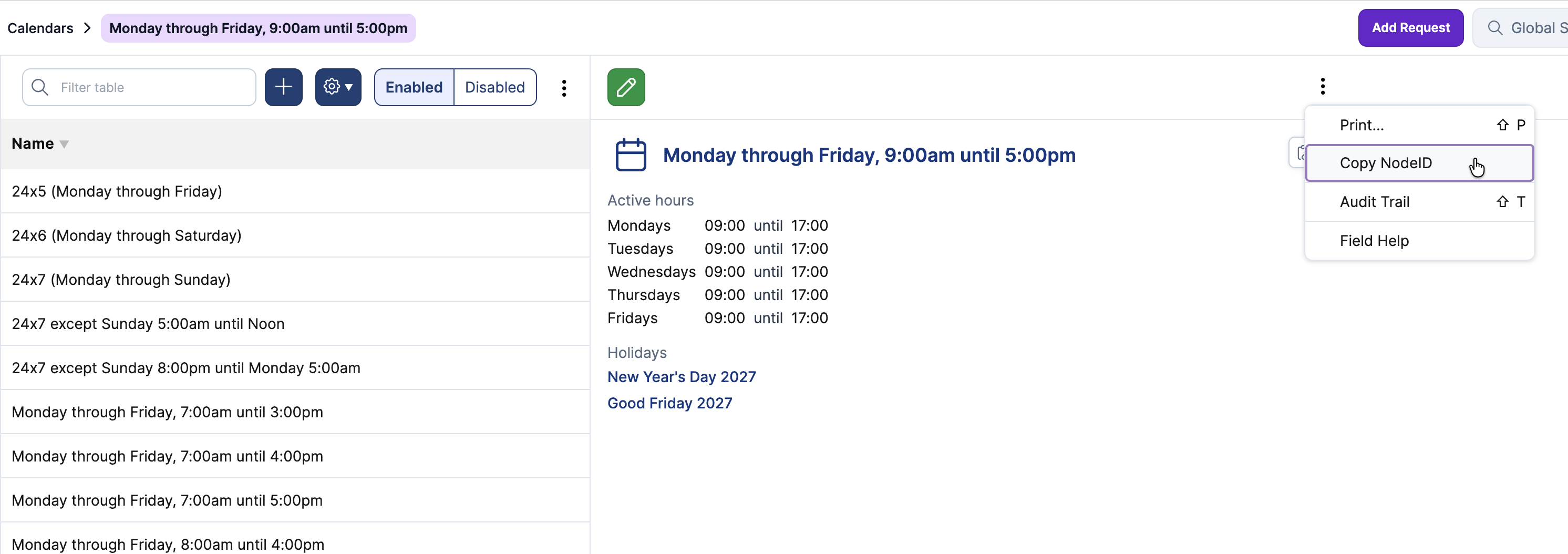
Adjust the values to match your setup. To determine the calendar node IDs, go to the Calendars menu in Xurrent, and for each calendar that you want to link the holidays to, copy the node ID via the action menu of the record.
Putting the configuration settings in a dedicated package with the type Environment library is considered a best
practice, as it allows you to easily change the configuration without having to change the code of the integration.
Usually, the configuration of an integration in a sandbox / test environment will be different from the production environment. For example, if you're testing the integration against a Xurrent demo or QA account, then the calendar node IDs will be different from the ones you'll use in production.
Separating the configuration to a separate package helps to ensure that you don't accidentally overwrite it when you transfer an integration from the sandbox environment to production.
The main package
The next step is to create the main package that will contain the integration logic:
- Add a new package with name
Calendarific -> Xurrent - Open the package settings and set the following fields:
- Package type:
Standard package - Description:
Sync national holidays from Calendarific to Xurrent - Libraries: Add the
Calendarific -> Xurrent Settingslibrary - Triggers: Add a trigger with:
- Trigger type: Schedule
- Account:
Xurrent - Schedule:
Yearly in August
- Check Send error mails
- Fill in the Error email recipients field with your email address
- Package type:
- Go back to the package script. In the header comment, fill in the subject and summary, for example:
- Subject: Sync national holidays Calendarific -> Xurrent
- Summary: Retrieves national holidays from Calendarific (https://calendarific.com/), and imports them into Xurrent, linking them to the calendar(s) specified in the settings.
- Below the header comment, add the code listed below. We will explain the various pieces later on.
// 1. Get holidays from Calendarific
const calendarificHolidays = fetchCalendarificHolidays();

// 2. Convert them into the format Xurrent understands
const holidaysForXurrent = mapToXurrentFormat(calendarificHolidays);

// 3. Keep only holidays that do NOT exist yet
const holidaysToCreate = skipExistingHolidays(holidaysForXurrent);

// 4. Create the missing holidays in Xurrent
createHolidays(holidaysToCreate);

// Done 🥳

//
// Helper functions
//

function fetchCalendarificHolidays() {
  const apiUrl = buildCalendarificUrl();
  const response = rest_get(apiUrl, settings.calendarificAccount);

  if (response?.meta?.code !== 200) {
    throw new Error(
      `Unexpected response ${response?.meta?.code} from Calendarific API`,
      { cause: response }
    );
  }

  return response.response?.holidays ?? [];
}

function buildCalendarificUrl() {
  const params = [
    `country=${settings.countryCode}`,
    `year=${settings.year}`,
    `type=national`
  ];
  return `?${params.join("&")}`;
}

function mapToXurrentFormat(holidays) {
  return holidays.map(holiday => {
    // Truncate name to ensure it fits Xurrent's size requirements
    const name = holiday.name.substring(0, 120);
    const isoDate = holiday.date.iso;
    return {
      name: `${name} ${holiday.date.datetime.year}`,
      startAt: `${isoDate}T00:00`,
      endAt: `${isoDate}T24:00`,
      source: settings.xurrentSource,
      sourceID: `${settings.countryCode}-${isoDate}`,
      calendarIds: settings.xurrentCalendarNodeIDs
    }
  });
}

function skipExistingHolidays(allHolidays) {
  const existingHolidays = fetchExistingHolidays();
  const existingHolidaysByName = existingHolidays.indexBy("name");

  const skippedHolidays = allHolidays
    .filter(holiday => existingHolidaysByName[holiday.name] != null)
    .map(({ sourceID, name }) => `${sourceID} - ${name}`);

  if (skippedHolidays.length > 0) {
    log(`${skippedHolidays.length} holidays already exist and will be skipped`, skippedHolidays);
  }

  return allHolidays.filter(holiday => existingHolidaysByName[holiday.name] == null);
}

function fetchExistingHolidays() {
  return Xurrent.graphqlQuery("holidays", {
    first: 10000,
    fields: ["name"]
  }, settings.xurrentAccount);
}

function createHolidays(holidays) {
  for (const holiday of holidays) {
    Xurrent.graphqlCreate("holidays", {
      input: holiday
    }, settings.xurrentAccount);
  }

  const createdHolidays = holidays.map(({ sourceID, name }) => `${sourceID} - ${name}`);
  log(`${holidays.length} holidays created`, createdHolidays);
}
The integration is divided in five main steps, indicated by comments in the code above:
- Get holidays from Calendarific
- Convert to Xurrent format
- Skip existing holidays
- Create holidays in Xurrent
Each of these steps is implemented in a separate function with a descriptive name, so that the overall integration logic is easy to follow.
Let's look at each of the steps in more detail.
Get holidays from Calendarific
The first step is to fetch the national holidays from Calendarific, implemented by the fetchCalendarificHolidays
function.
It uses a helper function to construct the API URL using the country code and year from the settings, and limiting the result to national holidays (which are most likely the ones that correspond to a day off).
The resulting URL is something like this:
`?country=AT&year=2027&type=national`
The rest_get function will automatically take care of adding the api_key authentication parameter to the request,
based on how you configured it in the account.
After fetching the result, the function checks if the API call was successful.
The Calendarific API documentation shows that the response will contain a
meta.code field with the HTTP status code of the response, and that 200 indicates success.
Anything else indicates failure, and we throw an Error to abort the package. Since you've configured the integration
to send error emails, you will receive an email in such an event and can investigate the issue.
Convert to Xurrent format
The next function is mapToXurrentFormat. This is fairly straightforward: it maps the holidays from Calendarific to the
input data that Xurrent expects when creating a holiday via its GraphQL API.
One thing to note is that the name field is truncated to ensure that it fits Xurrent's size requirements. We don't
really think that there are holidays with names longer than 120 characters, but defensive programming - "expect the
unexpected" - is a good idea.
Skip existing holidays
The function skipExistingHolidays is another bit of defensive programming.
Xurrent doesn't allow you to create holidays with duplicate names, so we fetch a list of all existing holidays in the account and check our list against it. We log the source ID and names of the holidays that we skipped, and return the rest.
Fetching the existing holidays is done by the fetchExistingHolidays helper function.
It uses the Xurrent.graphqlQuery function to do this.
Note that we are only interested in the name of the holiday, so we only request the name field and nothing else.
Create holidays in Xurrent
Finally, the function createHolidaysInXurrent creates the holidays in Xurrent
using the Xurrent.graphqlCreate function.
Once it's done, it logs the holidays that were created, so that you can see what happened.
Running the integration
If you've set everything up correctly, you can now start a test run to see what happens. The output might look something like this:
5 holidays already exist and will be skipped
  [
    "AT-2027-01-01 - New Year's Day 2027",
    "AT-2027-03-29 - Easter Monday 2027",
    "..."
  ]

7 holidays created
  [
    "AT-2027-01-06 - Epiphany 2027",
    "AT-2027-05-01 - Labor Day / May Day 2027",
    "..."
  ]
If you log in to Xurrent and check the holidays and calendars, you should see that the holidays have been created and linked to the correct calendar(s).
Once you're satisfied with the results, the integration is ready to be deployed to production. Use the transfer assistant to transfer the packages, accounts and schedule to the production environment, adjust the configuration settings (the accounts and the settings package) as needed, and you're done.
Exercises
This section contains some (thought) exercises that you could think through or try out to gain a better understanding of the integration. They also provide some starting points for customizing the integration to your needs.
- In the design decisions, we mentioned that we're only creating holidays for the public, federal and bank holidays. What if you're interested in local, regional and state holidays? Read the Calendarific API documentation to find out the answer.
- What if you're interested in both "public, federal and bank holidays" and "local, regional and state holidays"?
- Can you adjust the integration so that it creates holidays for multiple countries?
- There are almost certainly overlapping holidays between countries. What will happen in this case? Do you need to adjust the integration?
- Can you adjust the integration so that it creates holiday in multiple Xurrent accounts?
- Instead of sending an error email, you could also create a Xurrent request to notify you about failures. How would you
do that? Investigate error handling and
the
Xurrent.graphqlCreatefunction. - Can you adjust the integration so that it also sends an email on successful execution? Investigate
the
sendMailfunction. Because the integration runs only once a year and it is easy to forget that it exists, this might be a useful addition!