Release r202613
What's new
This release contains the following new feature:
Find in packages
A very useful feature has been added that allows you to quickly search through the code of all packages in the current environment.
To bring up the "Find in packages" dialog from anywhere in the environment, type Ctrl+Shift+F (Windows) or Cmd+Shift+F (Mac):
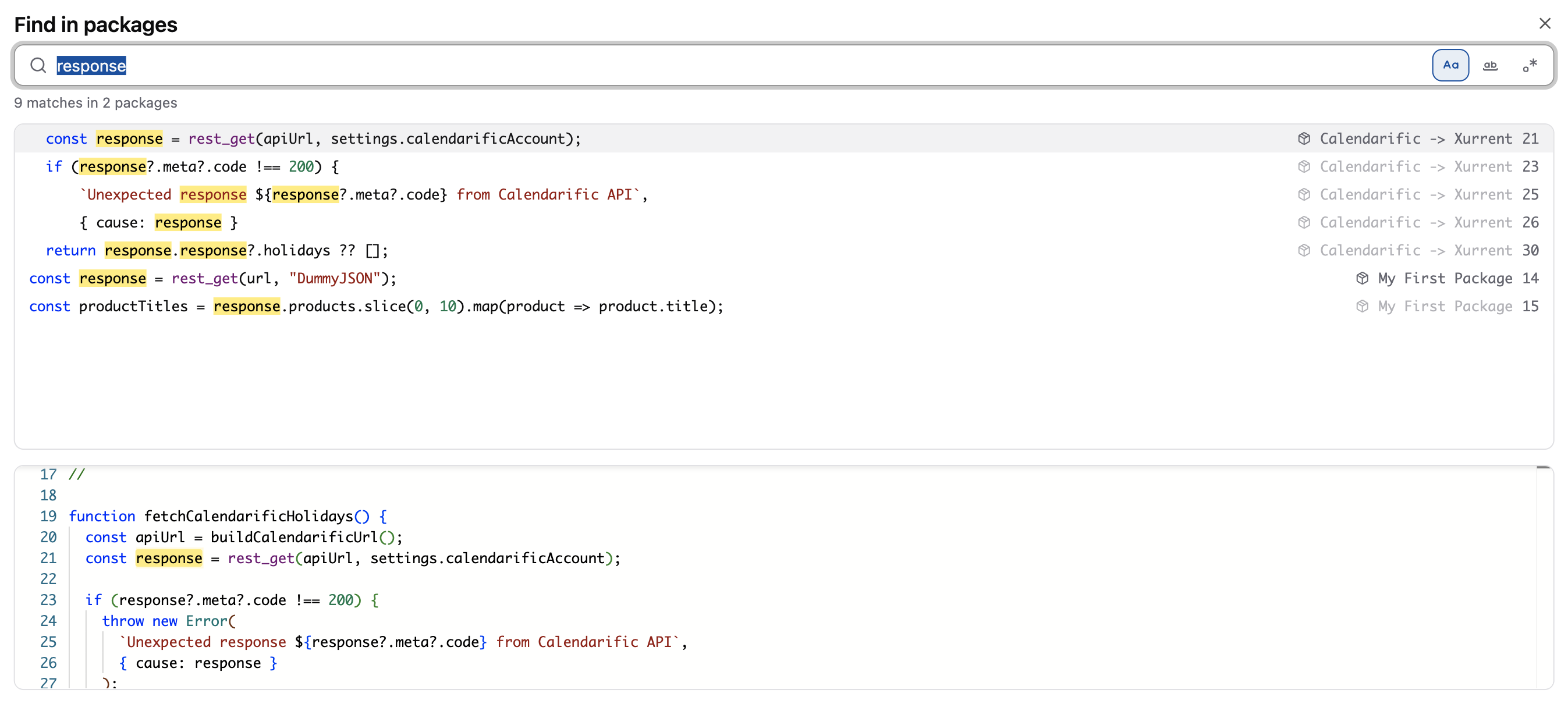
The dialog has a ton of features that make it easy to use, for example:
- Navigate through the search results with the arrow keys.
- Select a search result with the
Enterkey to navigate directly to the corresponding line in the code. Alternatively, double click the result to open it in the editor. - The search field is prepopulated with the currently selected text. This not only works for code selected in the
package editor, but from anywhere in the environment.
- As an example use case, suppose you want to search for all references to an account name. In the Accounts tab, just select the account name and press the shortcut key for the "Find in packages" dialog to immediately see the results.
- Refine the search results by using the toggles for case sensitivity, matching whole words only and regular expressions.
- Search results are syntax highlighted to make them easy to scan.
- A resizable preview of the code is shown below the currently selected search result to see it in context.
Should you ever forget the shortcut key: the dialog can also be accessed via the command palette of the package editor.
Press F1 to bring up the command palette, and then search for "find in packages":

Other changes
This release contains a number of smaller changes:
-
Fix: When an inbound email configuration was set to use the Microsoft Graph protocol, the Verify button sometimes reported "success" incorrectly. This has been improved, and it is now checked that the
Mail.ReadWritepermission is configured in Azure, and that both the Inbox and Archive folders exist and can be accessed by the automator. -
Fix:
fetch,fetchAllandfetchFilterdid not parse thecustom_datafield on the returned records when the module path included a predefined filter (e.g."cis/active"). Thecustom_datais now correctly returned as a parsed object instead of a JSON-encoded string. -
Fix: the
file_read_csvfunction, which is suitable for processing very large CSV files, in certain cases produced incorrect results. To fix this, the underlying implementation has now been switched to the rock-solid csv-parse library. In addition, its error reporting has been improved to make debugging easier.The functions related to CSV processing have been grouped together on the CSV functions page.
-
Code completion in the package editor now suggests predefined-filter paths (such as
"cis/active"or"requests/open") as the first argument offetch,fetchAllandfetchFilter. -
In r202611 we removed the redundant encryption password field from file repositories. The functions
file_create_encryptedandfile_read_encryptedthat made use of this field have now been removed and all occurrences of these functions have been migrated tofile_createandfile_read.
Timeline
The expected deployment dates for this release are:
| Environment | Date |
|---|---|
| Demo | Friday, May 22nd |
| Production (automator-eu, automator) | Tuesday, May 26th |
| Production (automator-bt, automation) | Thursday, May 28th |
The deployment of the Production environments will be conducted outside of office hours (Central European Time Zone).