Release r202611
What's new
This release contains the following new features and improvements:
- Browse files in file repositories
- Simplified configuration of file repositories
- Use Microsoft Graph for processing inbound email
- Navigate between sibling libraries
- Auto-reload profile when changed by someone else
Browse files in file repositories
A file browser has been added to accounts with account type "File repository". Press the "Browse files" button in the account form to open the browser in a popup.
The file browser allows you to view and download files in the repository, with options to sort and filter. You can also upload and delete files.
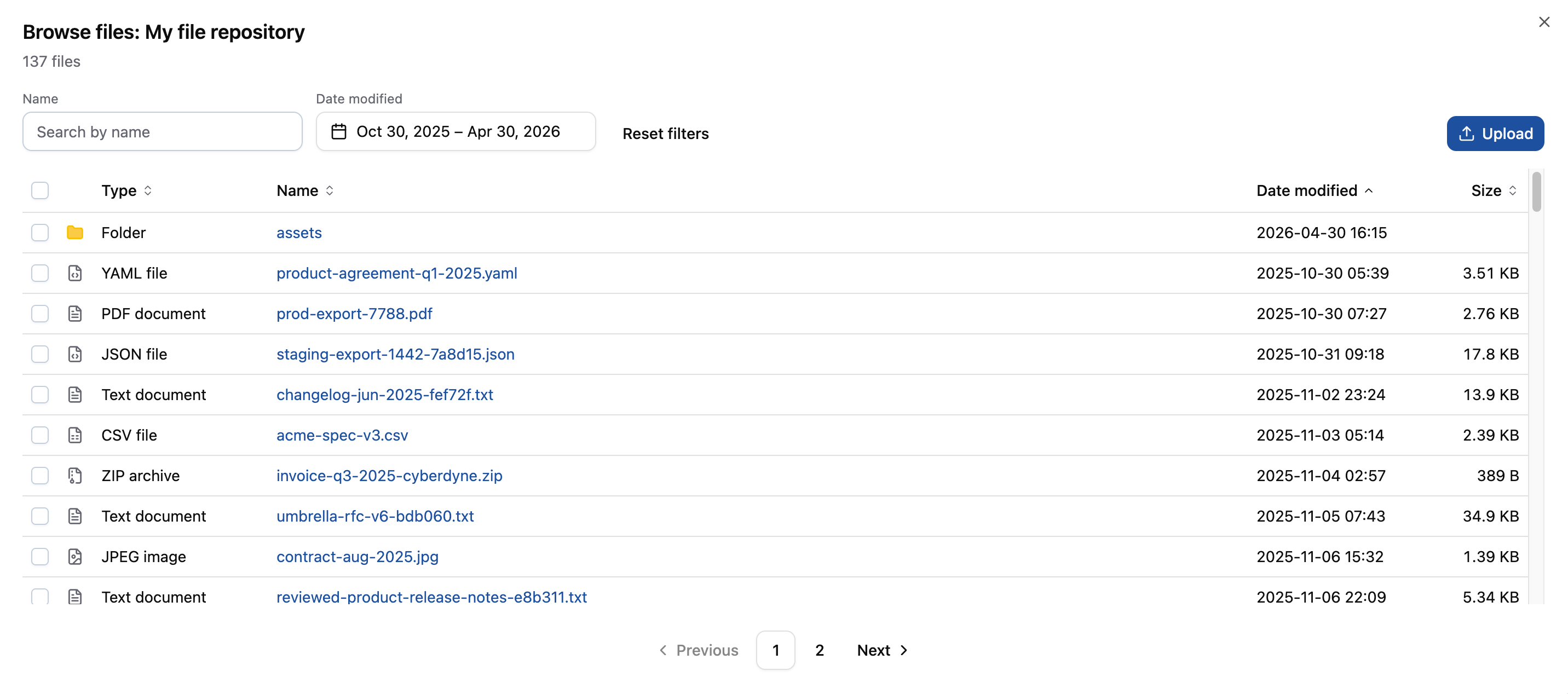
The file browser is only available for file repositories using permanent storage (see below).
Simplified configuration of file repositories
We have simplified the configuration options for accounts with account type "File repository" to a single "Repository type" selectbox with options:
- Session-scoped temporary storage
- Public permanent storage
- Private permanent storage
We have added a complete example to the documentation that illustrates how to use session-scoped temporary storage to power a web form that allows users to upload files.
When the option "Public permanent storage" is selected, the URL at which files stored in the repository can be accessed is displayed.
Finally, the optional "Encryption password" field, which had limited usage, has been removed. This field was redundant, because files in all file repositories are already encrypted.
Use Microsoft Graph for processing inbound email
It is now possible to use Microsoft Graph for processing inbound email. A new field "Protocol" has been added to the inbound email configuration form, which allows you to choose between IMAP and Microsoft Graph.
As IMAP relies on Basic Auth, which is increasingly disabled via Modern Authentication enforcement or Conditional Access policies, this will be a welcome feature for customers integrating with a Microsoft 365 environment.
Navigate between sibling libraries
A few releases back, we added the possibility to navigate from a package to its libraries, and from a library to the packages that use it.
We have now expanded this functionality to include the possibility to navigate between sibling libraries used by a package, which will be very useful for complex integrations that have many interdependent libraries.
How it works: when you are viewing a library in the context of a main package, you place the cursor on a function call
that is defined in another library used by the package and press F12, you will be taken automatically to the function
definition in that sibling library.
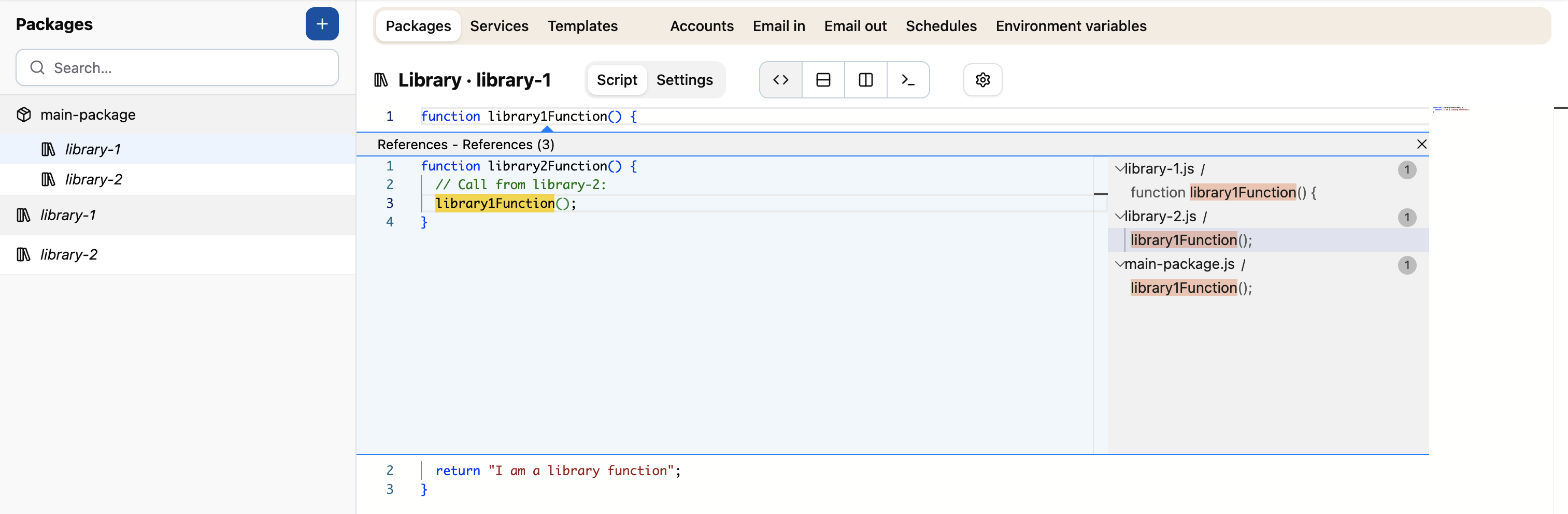
It also works the other way around: when viewing a library in the context of a main package, the list of references that
is shown when placing the cursor on a function definition and pressing F12 will now include references from other
libraries used by the package. This makes it very easy to navigate around complex integrations.
The following screenshot shows an example of this. The package main-package uses the libraries library-1 and
library-2. The library library-2 calls a function library1Function that is defined in library-1. As the
screenshot indicates, this cross-reference between sibling libraries is now also shown in the list.
Finally, when editing a library in the context of a main package, code completion will now also suggest functions from sibling libraries.
Auto-reload profile when changed by someone else
The profile lock indicator at the top of the screen shows whether someone else is currently editing the profile, and prevents you from making changes at the same time.
We have now added a small usability improvement to this: whenever the other user saves their changes, those changes will automatically be loaded and become visible to you. This allows you to immediately see updates, without having to refresh the page.
Other changes
This release also contains a number of smaller changes:
- Fix: Cached OAuth tokens are now invalidated when the account associated with the token is updated. This solves issues during account setup, where the presence of a cached token could cause configuration changes to be "invisible" for up to the expiration date of the token.
- Fix: Return statements
inside for-of loops now
behave as expected. Previously, they were treated the same as
continuestatements. - Fix: The increment and decrement operators
++and--now work on object properties as well. For exampleconst x = { a: 0 }; x.a++;no longer throws an exception but correctly incrementsx.ato1. - Fix: Accessing a property with a
nullvalue no longer incorrectly triggers the auto-fetch behavior. - Fix: In some cases, the automator adds a warning to the package logs, for example when a package has syntax errors that are not supported by the AutomatorScript engine that was introduced at the beginning of this year. These warnings were not shown in the log viewer, however, unless you set the log level filter to the lowest "debug" level. This has now been fixed, and warnings will also be visible when the level is set to "info" or "verbose".
- The automator supports a limited number of functions on built-in objects that follow the behavior of native JavaScript. Until now, using functions outside of the documented list was allowed in a few edge cases. However, after closely monitoring actual usage of these functions for a few months, we have now tightened the restrictions, and exceptions are no longer allowed.
- The library used for supporting SOAP client functions and for configuring services to act as SOAP server has been updated to the latest version. In some cases, when invalid SOAP messages are received by us, the response may be slightly different than before.
Timeline
The expected deployment dates for this release are:
| Environment | Date |
|---|---|
| Demo | Friday, May 8th |
| Production (automator-eu, automator) | Tuesday, May 12th |
| Production (automator-bt, automation) | Thursday, May 14th |
The deployment of the Production environments will be conducted outside of office hours (Central European Time Zone).