Release r202609
What's new
This release contains the following new features and improvements:
- New functions for Xurrent GraphQL API
- Updated support for Xurrent REST API
- New Get started documentation section
- Support for
newkeyword - Support for
instanceofkeyword - Error logs include stack traces
- Support for
new Error() - New function
Array.wrap() - New functions
Array.renameKeys()andArray.pick() - Schedules can be disabled
New functions for Xurrent GraphQL API
We have added several new functions to make it easy to work with the Xurrent GraphQL API:
Xurrent.graphqlQuery()Xurrent.graphqlCreate()Xurrent.graphqlUpdate()Xurrent.graphqlDelete()
Read more about these new functions on the Xurrent GraphQL API page.
The automator has always had great support for the Xurrent REST API via functions such as fetch and fetchFilter. However, the REST API has limited filtering capabilities and often requires multiple queries to walk through the object model.
In contrast, the filtering capabilities of the Xurrent GraphQL API are much more powerful, and by constructing precise queries you can often retrieve exactly the data that you need, including nested relations.
The newly added automator functions unlock this power and make working with the Xurrent GraphQL API a breeze.
For example, the following script retrieves the id, name, source and sourceID of all enabled skill pools:
const skillPools = Xurrent.graphqlQuery("skillPools", {
  fields: ["id", "name", "source", "sourceID"],
  filter: { disabled: false }
});
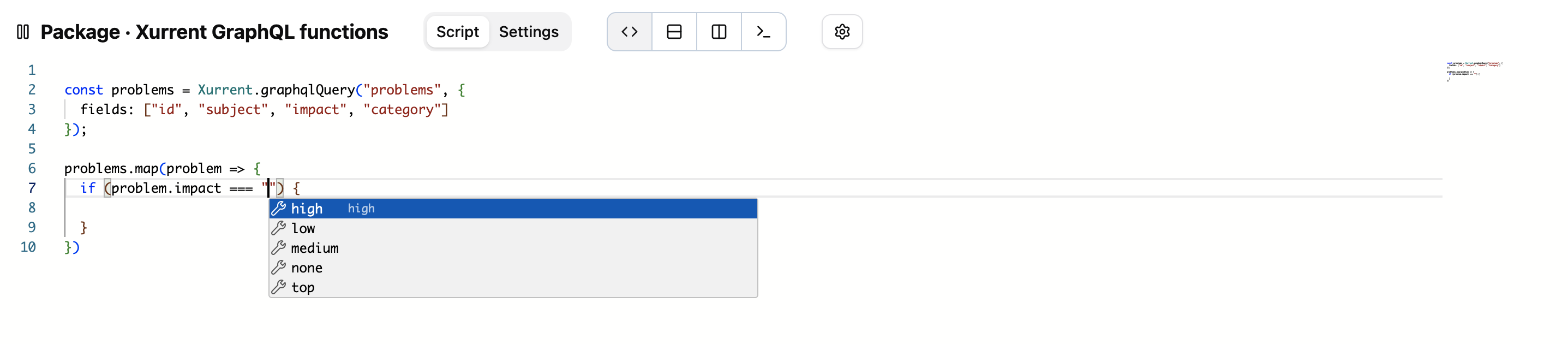
The code editor supports auto-completion via Ctrl + Space to help you write the GraphQL query, and to process the
results. For example, the following screenshot shows the auto-completion suggestions for
the problem impact field:
Updated support for Xurrent REST API
Over the past months, Xurrent has added several new models and fields to the API, most notably the introduction of RFC types.
The automator has been updated to support these new models and fields, and includes all the changes up to April 4, 2026.
New Get started documentation section
We are constantly improving the automator documentation. This week, we have added a new Get started section with a couple of tutorials, to guide new users through the basics of the automator.
Support for new keyword
AutomatorScript now supports the new
keyword.
This means that it is no longer necessary to use special functions such as newMap,
but instead you can use the new keyword directly. For example:
const map = new Map();
const set = new Set([1, 2, 3]);
const releaseDate = new Date(2026, 4, 21);
The following object types can be constructed:
MapSetDateRegExpError(more about this below)
The special functions for constructing the first four of these objects are
now deprecated, and you are encouraged to use the new keyword
instead.
Support for instanceof keyword
AutomatorScript now supports the instanceof
keyword. This can be used to check the type of an object, for example:
const date = object instanceof Date ? object : Date.parse(object);
Error logs include stack traces
When an error occurs during package execution, the logs and error notification mails now include the stack trace, so that it is easier to trace the location of the error:
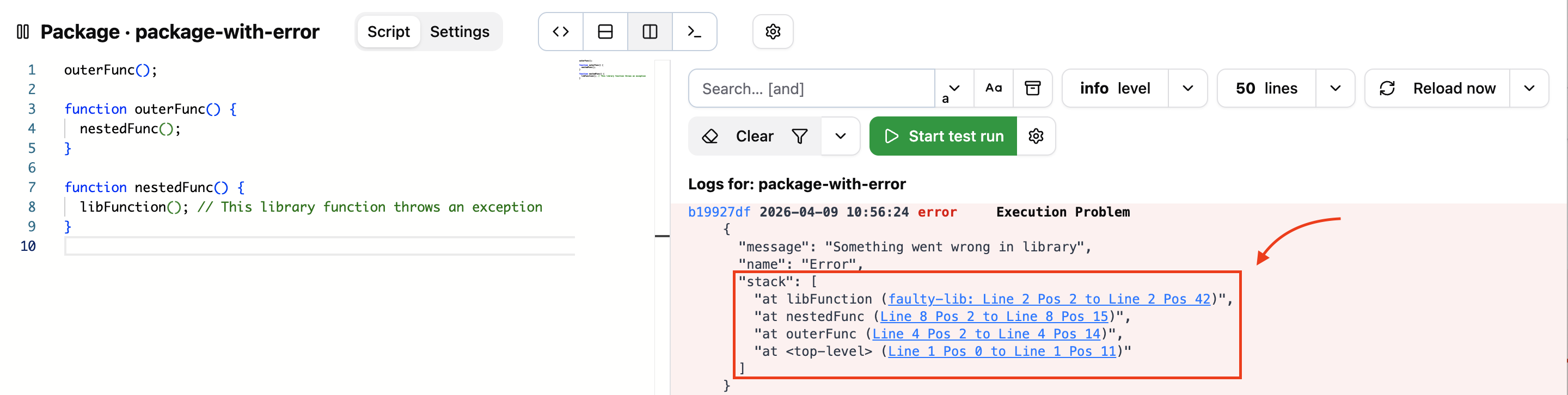
Each line of the stack trace is clickable and opens the corresponding line in the script of the package, or in its associated libraries.
Support for new Error()
In standard JavaScript, when you throw an exception, it
is recommended to
throw an instance of the Error class.
However, although AutomatorScript already supported the throw keyword, until now it was not possible to construct an
Error object, which meant that you had to throw strings or arbitrary objects instead.
Now that the new keyword has become available, you can also use new Error() and follow the JavaScript best practices:
if (somethingIsWrong()) {
  throw new Error("Something went wrong");
}
You can find more information in the automator documentation on error handling and the Error object.
New function Array.wrap()
We have added a new array function Array.wrap().
This function takes a value and returns the value as-is if it is an array, and otherwise wraps it in an array.
This can be very useful, for example, when dealing with Xurrent custom fields, which value can sometimes be a single
element and sometimes be an array, depending on whether the field was marked as "Multiple". By wrapping the value in an
array, you can further process it in an uniform way, using functions such as map.
let val1 = Array.wrap(42); // => [42]
let val2 = Array.wrap([42]); // => [42]
let val3 = Array.wrap([42, 43]); // => [42, 43]
New functions Array.renameKeys() and Array.pick()
New array functions Array.renameKeys() and
Array.pick() have been added.
These functions make it easier to transform arrays of objects from one format to another.
As a practical example, consider an array of objects that are the result of performing a Xurrent CSV export. The objects contain many fields and have spaces in the field names:
[
  {
    "ID": 12345,
    "Source ID": "xyz",
    "Created At": "...",
    "...": "..."
  },
  "..."
]
The renameKeys and pick functions make it easy to remove the spaces and leave only the fields that you are interested in:
const mapping = { "ID": "id", "Source ID": "sourceId" };
const attributesToPreserve = ["id", "sourceId"];
requests.renameKeys(mapping).pick(attributesToPreserve);
// Result:
// [
//   {
//     id: 12345,
//     sourceId: "xyz"
//   },
//   "..."
// ]
Schedules can be disabled
A small, but useful, enhancement is the ability to disable schedules. Until now, to temporarily prevent a schedule from running, you had to resort to workarounds such as changing the Cron expression to an "impossible" value. This is no longer necessary: you can now use the "Enabled" checkbox to switch schedules on and off.
Important updates
Merge audit information setting will be removed
The package execution setting "Merge audit information into inbound Xurrent object" will be removed in this release.
When the release is deployed, we will migrate package that were using this setting by adding the equivalent
AutomatorScript at the beginning of the package script.
For example, if the package was triggered by a request webhook from Xurrent,
the package script will now start with the following line:
if (request != null) mergeAudit(request); // Auto-generated by system
Schedules without active packages will be disabled
As indicated above, schedules can now be disabled. When the release is deployed, we will run a migration script to automatically disable all schedules that are not associated with any active package.
Deadline passed for signing in to keep current password
If you have already logged into the automator at least once since November 20th, 2025, no action is needed, and you can ignore this message.
As indicated in the release notes of r202605, the deadline for signing in to keep your current password has passed on March 31th. To keep using the automator, please regain access by clicking "Need help signing in?" on the login page and following the instructions there.
Timeline
The expected deployment dates for this release are:
| Environment | Date |
|---|---|
| Demo | Friday, April 10th |
| Production (eu and bt) | Thursday, April 16th |
| Production (other instances) | Tuesday, April 21st |
The deployment of the Production environments will be conducted outside of office hours (Central European Time Zone).