Release r202608
What's new
This release contains the following new features and improvements:
- Script mode for Proxy account types
- Structured HTTP headers field
- New String and Set functions
- Retrieve audit details for a specific change
- Auto-update callers when renaming library functions
- Workflow webhook events
Script mode for Proxy account types
To allow more control over what can and, more importantly, what cannot be executed on the automator Proxy, we have added a new script mode to proxy account types. Script mode limits execution to a pre-defined set of scripts with named parameters that are configured on the proxy side.
To use script mode, set the execution mode to "Script" in the account
settings. You can then use it with
executeOnProxy as follows:
const result = executeOnProxy("my-proxy-account", {
  script: "deploy",
  parameters: { "--environment": "production", "--version": "1.2.3" },
})
Using script mode requires the automator Proxy to be upgraded to a version that supports it. Please register a request with us so that we can provide you with the instructions for and / or assist you with the upgrade.
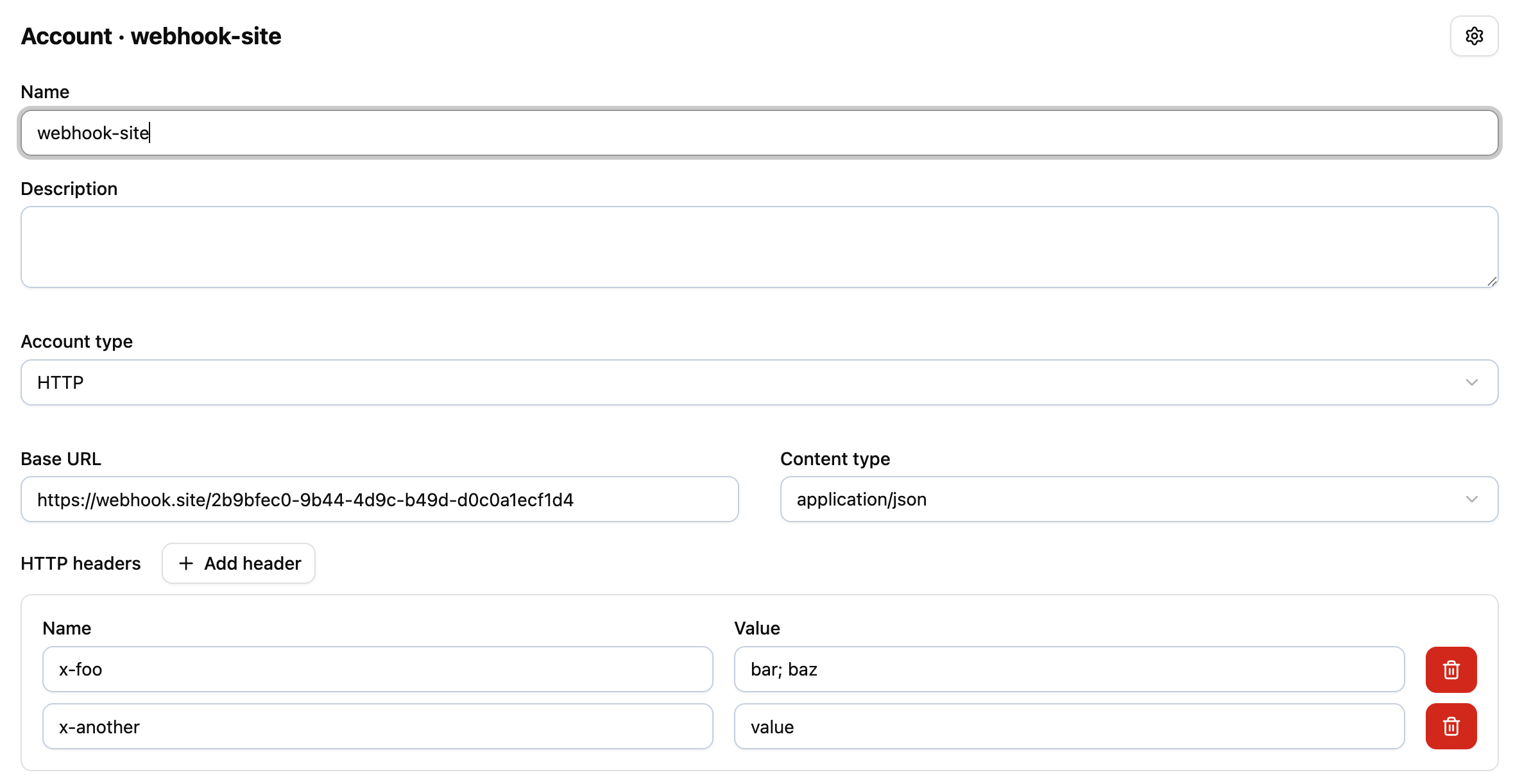
Structured HTTP headers field
The HTTP headers field on the account form has been replaced with a structured name/value pair editor. You can now add and remove headers individually instead of editing a free-text field. Existing header values are automatically migrated.
New String and Set functions
We have added support for the following methods:
String.at()Set.keys()
// String.at() - access characters by index, including negative indices
let str = "automator"
str.at(0)   // "a"
str.at(-1)  // "r"

// Set.keys() - returns the keys of a Set
let s = new Set(["a", "b", "c"])
let keys = s.keys()
// keys = ["a", "b", "c"]
Learn more at the MDN String.at() reference and the MDN Set.keys() reference.
Retrieve audit details for a specific change
The mergeAudit function now
accepts an optional audit_line_id parameter. This allows you to retrieve the
audit details for a specific change, rather than only the most recent one.
let auditLineId = 456
mergeAudit(request, auditLineId)
// request.audit_old_status     = "assigned"
// request.audit_new_status     = "in_progress"
Auto-update callers when renaming library functions
As a follow-up to the Navigate between packages and libraries feature from the previous release: when you rename a function in a library, all packages that reference that library are now automatically updated to use the new function name.
Workflow webhook events
The following webhook events are now available for use in webhook-triggered packages:
workflow.createworkflow.manager-changedworkflow.note-addedworkflow.status-changedworkflow.updaterequest.agile-board-column-changed
Important updates
Package execution log size limit
A maximum size limit has been introduced for individual log lines produced during package execution. Log entries exceeding 128 KB will be truncated.
Timeline
The deployments of the release will be performed on
| Environment | Date |
|---|---|
| Demo | Monday, March 23rd |
| Production (automator-eu.techwork.at) | Tuesday, March 31st |
| Production | Tuesday, April 7th |
The deployment of the Production environments will be conducted outside of office hours (Central European Time Zone).