Release r202601
What's new
In this first release of the new year, we have upgraded the AutomatorScript engine and added support for many modern JavaScript features:
- Object and array destructuring
- Spread syntax
- Optional chaining
- Nullish coalescing
- Logical assignment operators
deleteoperator- Object methods
- Code completion and highlighting improvements
We have also added some code completion and highlighting improvements to the code editor.
Object and array destructuring
Destructuring lets you pull values out of objects and arrays in a single step.
const request = fetch("requests", 704540, "wdc");
const { id, subject, member: assignee } = request;
// id = 704540
// subject = "NNM agent on CMP00002 is down"
// assignee = { id: 6, name: "Howard Tanner", ... }

function f() { // Function with multiple return values
  return [1, 2];
}

let [a, b] = f(); // Destructure to get the individual return values
// a = 1, b = 2
[b, a] = [a, b]; // Swap the values
// a = 2, b = 1
Destructuring is a very powerful feature that has many applications. Learn more at the MDN Destructuring reference.
Spread syntax
Spread syntax makes it easy to copy, merge, or extend objects and arrays.
const defaults = { retries: 3, timeout: 5000 };
const overrides = { timeout: 10000, logErrors: true };
const options = { ...defaults, ...overrides };
// options = { retries: 3, timeout: 10000, logErrors: true }

const arr1 = [1, 2, 3];
const arr2 = [4, 5];
const arr3 = [...arr1, ...arr2];
// arr3 = [1, 2, 3, 4, 5];
Learn more at the MDN Spread syntax reference.
Optional chaining
Optional chaining allows you to safely access deeply nested properties in a concise way.
Previously, you would have to write code like this:
const email = event && event.user && event.user.profile && event.user.profile.email;
With optional chaining, you can now simply write:
const email = event?.user?.profile?.email;
Learn more at the MDN Optional chaining reference.
Nullish coalescing
The nullish coalescing operator ?? is a safer way to provide sensible defaults for values that might be null or
undefined.
In the past, JavaScript developers often used the || operator for this purpose, for example:
const nrOfRetries = config.retries || 3;
However, this is not safe. If config.retries is 0, you might expect nrOfRetries to be 0, but the above will
still evaluate to 3.
The ?? operator solves this:
const config = { retries: 0 };
const nrOfRetries = config.retries ?? 3;
// nrOfRetries = 0
Learn more at the MDN Nullish coalescing reference.
Logical assignment operators
The logical assignment operators ||=, &&= and ??= are shorthand ways to combine logical operators with assignment.
let a = 0, b = 1, c = null;
a ||= 2; // Result: a = 2;
b &&= 3; // Result: b = 3;
c ??= "test"; // Result: c = "test";
Learn more:
- MDN Logical OR assignment reference
- MDN Logical AND assignment reference
- MDN Nullish coalescing assignment reference
Delete operator
Although not really "modern" JavaScript, the delete operator can still come in handy every now and then. It allows you
to remove a property from an object.
const person = { firstName: "John", lastName: "Doe" };
delete person.lastName;
// person = { firstName: "John" }
Learn more at the MDN delete operator reference.
Object methods
To make working with objects easier, we have added support for several standard Object methods:
Object.assign()Object.entries()Object.fromEntries()Object.keys()Object.values()
For example, you can use these methods to easily convert between Object and Map:
const obj = { a: 1, b: 2 };
const mapFromObj = new Map(Object.entries(obj)); // mapFromObj = Map { a => 1, b => 2 }
const objFromMap = Object.fromEntries(mapFromObj); // objFromMap = { a: 1, b: 2 }
Learn more at the MDN Object reference.
Code completion and highlighting improvements
Code completion for account parameters
In many of the AutomatorScript functions, one of the parameters is an account. The code editor now helps you to select the correct account, by providing appropriate suggestions based on the type of the account:

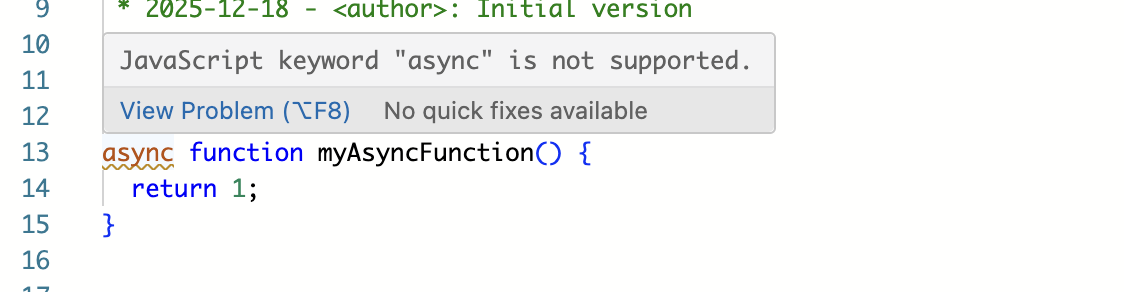
Highlighting unsupported keywords
AutomatorScript is a JavaScript-based language, but not all of its keywords are supported. The code editor will now highlight these:
Important
As indicated in the release notes for the previous release, packages containing syntax errors that are only considered valid in "loose mode" are not supported by the new AutomatorScript engine.
These packages will continue to work as before, but they are highlighted with a warning sign in the UI, and the syntax errors are indicated in the code editor. If you want to make changes to these packages, you will first need to fix the syntax errors in them.
Timeline
The deployments of the release will be performed on
| Environment | Date |
|---|---|
| Demo | Friday, December 19th |
| Production | Thursday, January 8th |
The deployment of the Production environments will be conducted outside of office hours (Central European Time Zone).