Transport modes
The transport mode determines who opens the connection between the automator and the proxy. It is selected on the Proxy account and, on the proxy side, per profile:
- Pull (default): the proxy connects to the automator.
- Push: the automator connects to the proxy.
Pull
With the pull transport mode, every connection is opened by the proxy from inside your network: the proxy polls the automator for work over outbound HTTPS, executes each command locally, and posts the encrypted result back.
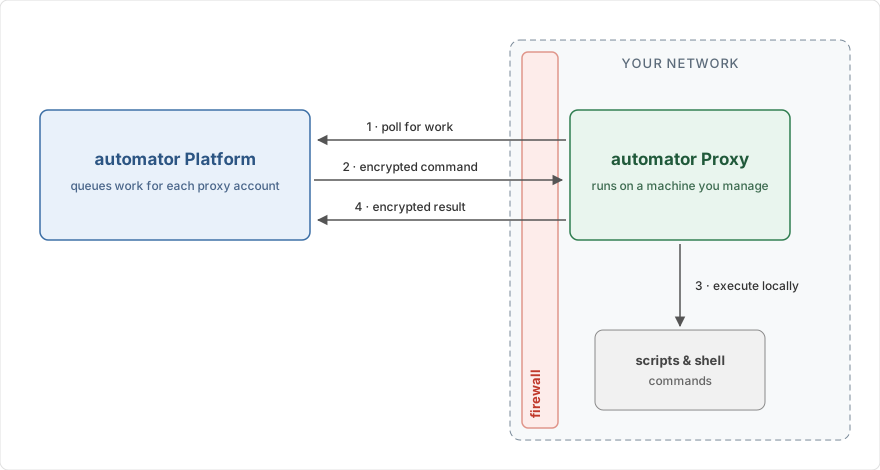
Because all traffic is outbound, no inbound firewall openings are needed, internal systems are never exposed to the internet, and your network security posture stays unchanged. This makes pull the default, and recommended, transport mode.
Connection details
- The proxy connects to the Automator URL shown on the Proxy account form; filling it in as a profile's
automator_urlsetting is what selects the pull transport mode (see Configuration). - All connections are outbound HTTPS, and the automator's TLS certificate is validated against the standard set of trusted certificate authorities. Corporate HTTP(S) egress proxies are not supported, so the machine running the proxy needs direct outbound HTTPS access to the Automator URL. When outbound traffic must be explicitly allowed, see Network configuration for the hostnames.
- On connection errors, the proxy retries with exponential backoff (5 seconds, doubling up to 60 seconds).
Push
With the push transport mode, the automator connects to the proxy and posts work to its HTTPS endpoint
(/execute/<profile>). The proxy executes the command and returns the encrypted result in the response.
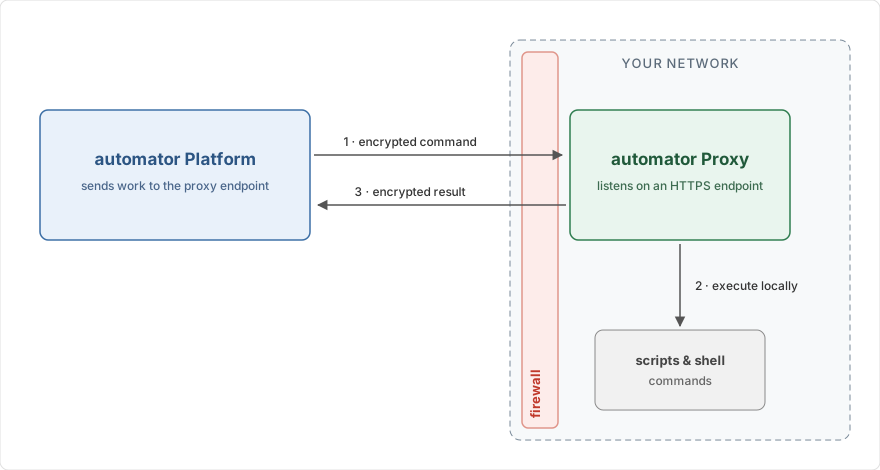
Push requires the automator to reach the proxy from the internet: your firewall needs an inbound opening for the proxy's endpoint, and the proxy should serve it over HTTPS with an SSL certificate (see Windows service settings). Restrict the opening to the automator's source IP addresses, listed in Network configuration.
Combining both modes
The transport mode is chosen per profile, so a single proxy installation can serve both: profiles with an
automator_url pull, all other profiles keep listening for pushes.