Execution modes
The execution mode determines what a Proxy account is allowed to execute on the proxy. It is selected as the Execution
mode on the account and as the mode of the matching profile; the two must match.
| Mode | What it executes |
|---|---|
| Script | A predefined script from an allowlist, with validated and escaped parameters |
| Command | An arbitrary shell command sent by the package (PowerShell, cmd, or a unix shell) |
Script
In script mode, the profile defines a fixed set of scripts, each with the parameter names it accepts. A package selects a script by name and passes named parameter values; the proxy validates the script name and the parameters against the profile, escapes the values, and executes the script.
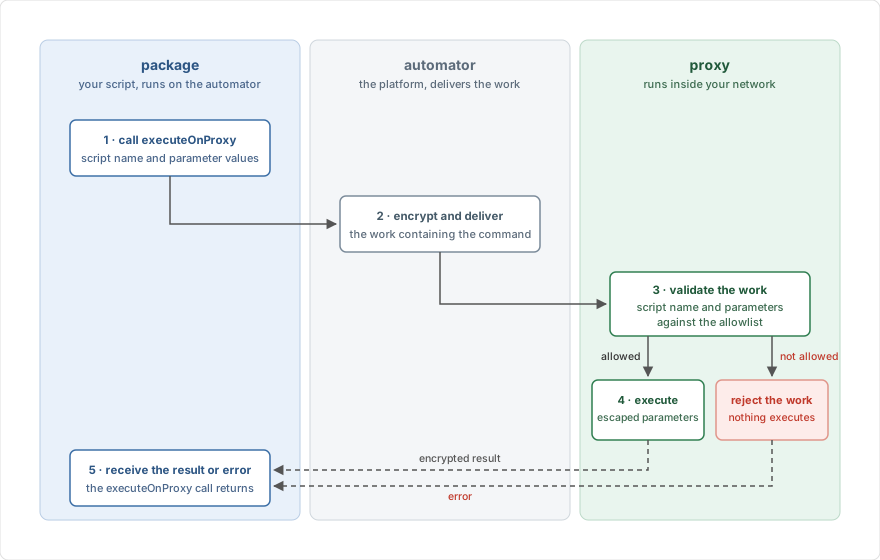
Nothing outside this allowlist can run: unknown scripts, unknown parameters, and raw commands are all rejected by the proxy. Script mode also uses the strongest encryption scheme, with tamper detection. See Security and privacy for the details.
Use script mode whenever the set of operations is known in advance. This is almost always the case for integrations. The Run scripts guide shows how to set it up.
Command
In exec mode, a package sends the complete shell command to execute. The profile determines the shell (PowerShell, cmd, or a unix shell) and the environment the command runs in, but not what the command does. Any command the proxy's user account can run is accepted.
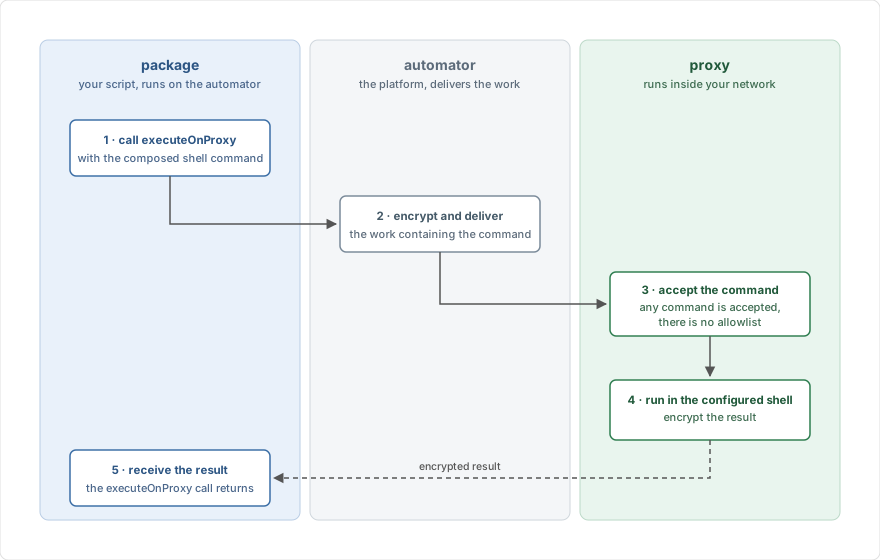
This offers maximum flexibility at the cost of control: prefer script execution unless packages genuinely need to compose commands at runtime. The Run shell commands guide shows how to use it.