Release r202629
What's new
This release contains the following improvements and changes:
- Microsoft SQL Server
- Syntax errors in packages
- HTTP QUERY method
- Dependencies between libraries
- Easier to create package libraries
Microsoft SQL Server
The new Microsoft SQL Server account type connects a package to a SQL Server database, in the same way that a MySQL account connects to a MySQL database. It supports SQL Server 2016 and later, and Azure SQL Database.
In a package, first select the SQL Server account with db_use.
All subsequent sql calls then run on the SQL Server database:
db_use("crm_database");

const customers = sql(
  "SELECT * FROM customers WHERE active = @active",
  { active: true }
);
Every database has its own quirks, and SQL Server is no exception. For example, it only supports named parameters
(@name), and lists of values and bulk inserts are passed as JSON and read
with OPENJSON:
const rows = [
  { name: "Alice", age: 30 },
  { name: "Bob", age: 42 },
];

sql(
  `INSERT INTO users (name, age)
   SELECT name, age FROM OPENJSON(@rows) WITH (name nvarchar(100), age int)`,
  { rows: JSON.stringify(rows) },
);
See Microsoft SQL Server for the connection settings, parameters, transactions and return values, and see Differences between databases for an overview of how the in-memory database, MySQL and SQL Server differ.
Changes to MySQL accounts
MySQL accounts have also been improved:
- MySQL accounts now always connect over an encrypted (TLS) connection, and verify the certificate of the server. The certificate must be issued by a public certificate authority or by Amazon RDS, and match the hostname.
- The new Trust server certificate field accepts the certificate of the server without validating it. Enable it when the server uses a self-signed certificate. The same field is available on Microsoft SQL Server accounts.
Syntax errors in packages
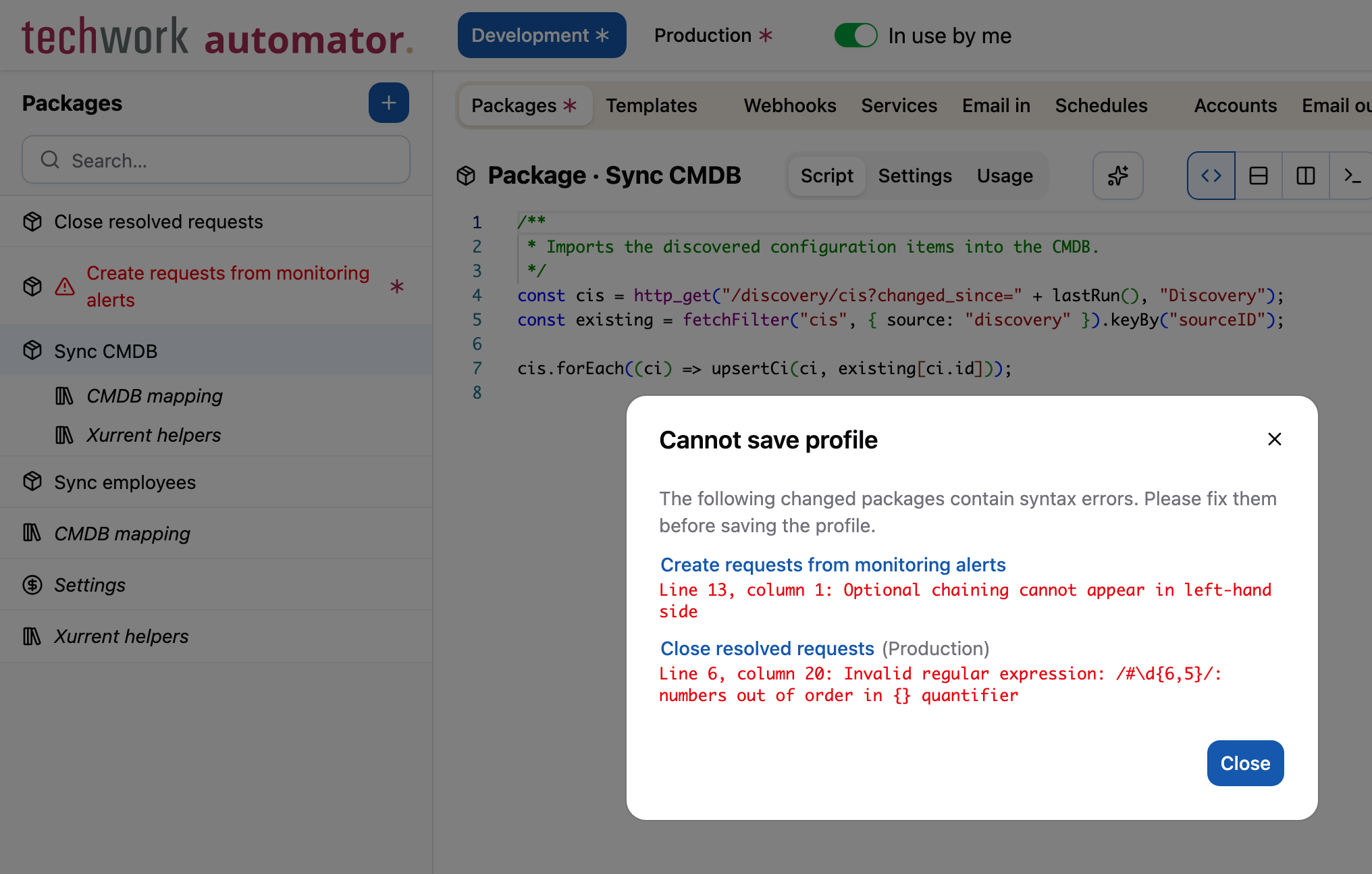
A profile cannot be saved when a changed package contains a syntax error. Until now, the message only said that there
was a syntax error somewhere, without mentioning the package, the line or the error itself. To make matters worse,
the code editor didn't always mark the error: it accepts some code that AutomatorScript rejects, such as optional
chaining on the left-hand side of an assignment (request?.custom_fields = []) or an invalid regular expression.
Such syntax errors are now much easier to find:
- The code editor now marks every syntax error that prevents saving with a red squiggly line.
- When you leave a changed package that contains a syntax error, the package is marked in red in the sidebar.
- When saving fails, the dialog lists the packages with syntax errors, including the line number and error message.
HTTP QUERY method
QUERY is a new HTTP method, standardized in RFC 10008 in June 2026. Like GET, it retrieves data without changing anything, but like POST, it sends its parameters in the request body instead of the URL. That makes it a good fit for searches with many or long parameters, which would make a GET URL too long, and for parameters that should not end up in URLs and log files.
The automator now supports the QUERY method in three places.
The new http_query function sends a QUERY request, in the same way as
http_post sends a POST request:
const result = http_query("/search", { ids: [1, 2, 3] }, "inventory");
http_request also supports the QUERY method:
const response = http_request({ url: "/search", method: "QUERY", json: { ids: [1, 2, 3] } }, "inventory");
Finally, services also accept QUERY requests on their API URL.
A QUERY request triggers the package with the Service
GET event, just like a GET request. The parameters from the request body are available in source.body, and
source.params.http_request_method is "query", so the package can tell the two apart:
if (source.params.http_request_method === "query") {
  const ids = source.body.ids;
  // ...
}
Note that QUERY is still fairly new, so external systems might not support it yet.
Dependencies between libraries
Until now, only standard packages and test packages could use libraries. In practice, libraries are often meant to be used together, with one library calling the functions of another. That works at runtime, as long as the main package lists all the libraries it needs, directly or indirectly, but the dependencies between the libraries themselves were implicit.
This has been improved, and libraries can use other libraries just like packages. This makes the dependencies easier to see, and makes managing large packages with many dependencies easier.
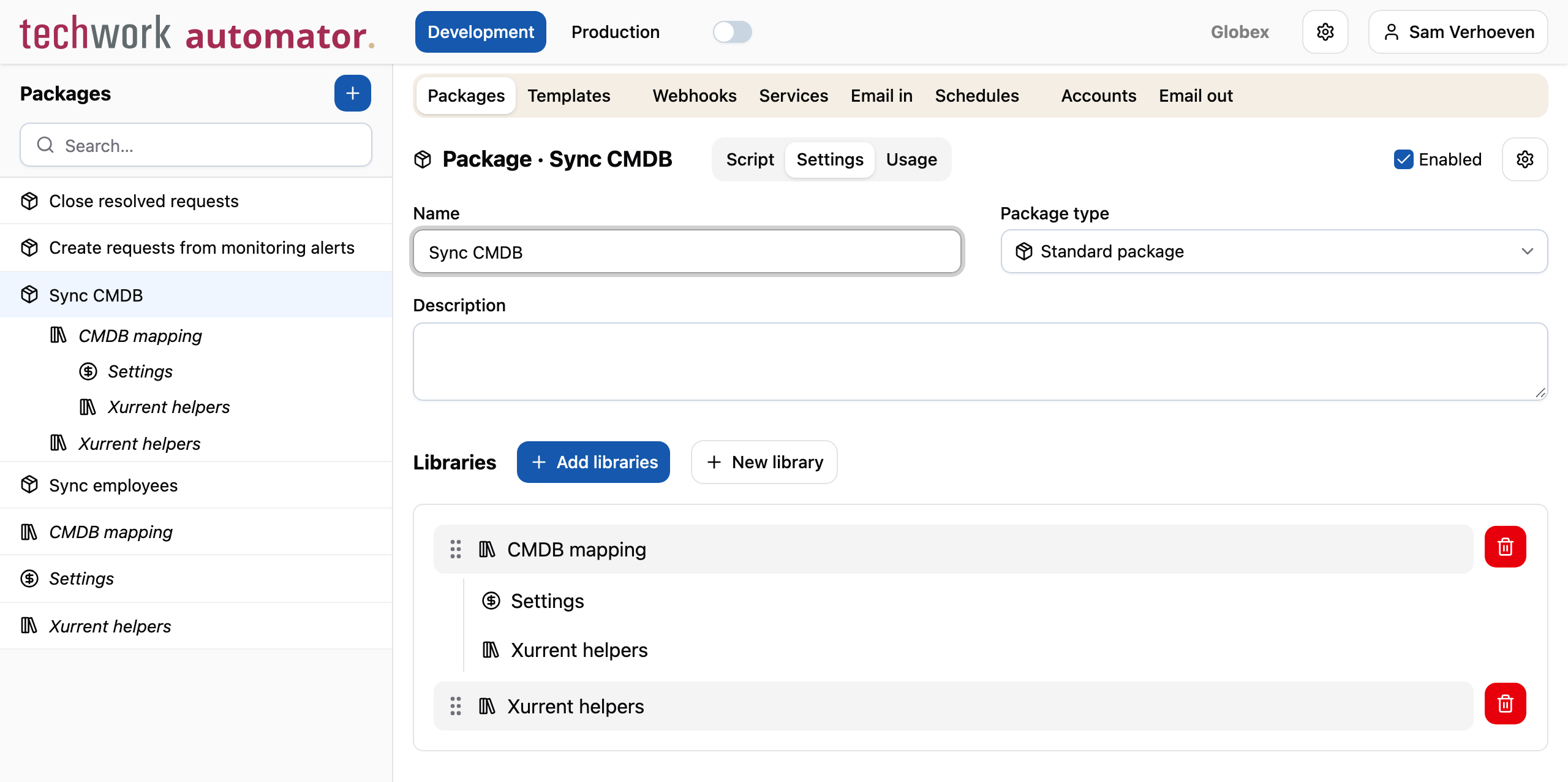
Libraries cannot use each other in a cycle, neither directly nor through other libraries. See Libraries for more information.
Easier to create package libraries
Creating a library used to take two steps: first create a standard package, and then change its type. The Add package dialog now has a Package type field, so any type of package can be created in a single step. Standard package is selected by default.
Creating a new library for a package has also been made easier: the New library button in the Libraries section on the Settings tab of a package creates a library and adds it to the package right away.
Other changes
This release contains the following smaller changes:
- Libraries are now evaluated in the order in which they are listed on the Settings tab of a package. Previously, they were evaluated in reverse order of when they were added. The libraries of existing packages have been reordered to match the previous evaluation order, so their behavior doesn't change. If a library uses other libraries, its dependencies are evaluated before the library itself.
- When a record is saved, settings that don't apply to it are now cleared. For example, the credentials of an authentication type that is no longer selected, or the fields of another account type. Previously, such settings stayed hidden in the item, but still showed up in, for example, the change history. Existing items have been cleaned up as well.
- Test packages can no longer have triggers, and no longer have the Enabled field.
- In the test run settings of a package, the trigger account can now also be selected for service events.
sendMailnow gives a clear error message when sending an email fails, including the name of the outbound email configuration and the reason, such as an authentication failure with Microsoft Graph or an invalid SMTP setting.sendMailnow throws an error whenbodycontains neithertextnorhtml, for example whenbodyis a string. Previously, an empty email was sent. Also,sendMailno longer returns a value. Previously, it returned an undocumented object with details of the sent email.- Templates are no longer rendered recursively. When a template uses multiple renderers, such as Comment, Curly, ASP,
values inserted by one renderer are no longer processed by the renderers that follow. Previously, data that happened
to contain template syntax, such as
{{ ... }}in a Xurrent note, was rendered as if it were part of the template. - The STARTTLS field of inbound email configurations was not used, and has been removed.
- Fix: verifying a new proxy account before saving it failed with an error.
Timeline
The expected deployment dates for this release are:
| Environment | Date |
|---|---|
| Demo | Friday, October 23 |
| Production | Tuesday, October 27 |
The deployment to the Production environment will be conducted outside of office hours (Central European Time Zone), usually between 8 and 10pm.