Release r202628
What's new
This release contains the following improvements and changes:
Account usage insights
Most external systems have various rate limiters to prevent abuse of their APIs. Xurrent, for example, allows a fixed number of requests per hour for each API token, and also has a query cost limit on GraphQL queries. When an integration runs into such a limit, the automator waits and retries the call, so the integration keeps working, but it slows down. Until now, there was no easy way to tell how close your integrations were to those limits, which package was responsible for most of the calls, or whether a limit was hit all the time or only at certain moments, such as during a nightly import.
The automator now records the usage of every account: the number of calls, the limit hits, the time spent waiting on rate limits, and the errors. This applies to all functions that use an account, so not only API calls to Xurrent and other HTTP, SOAP and Microsoft Graph accounts, but also SQL queries, file repository and SFTP operations, and so on. For APIs that report their remaining quota in their responses, which Xurrent and many other APIs do, the automator also records how much of the limit was used.
Usage is recorded from the moment this release is deployed, so no historical usage is available. Usage is collected per minute, which means it can take up to a minute for a call to show up.
The usage can be viewed in three places:
- the new Usage tab of an account
- the new Usage tab of a package
- View account usage in the actions menu in the header, for an overview of all accounts and packages of an environment
Each view shows the last 7 days by default. You can switch to the last 24 hours, 30 days or 90 days, or select a custom time range.
Usage of an account
The Usage tab of an account shows a separate section for each set of credentials, such as an API token or OAuth application of a Xurrent account. This is useful, because external systems usually apply their limits per set of credentials, and not per account.
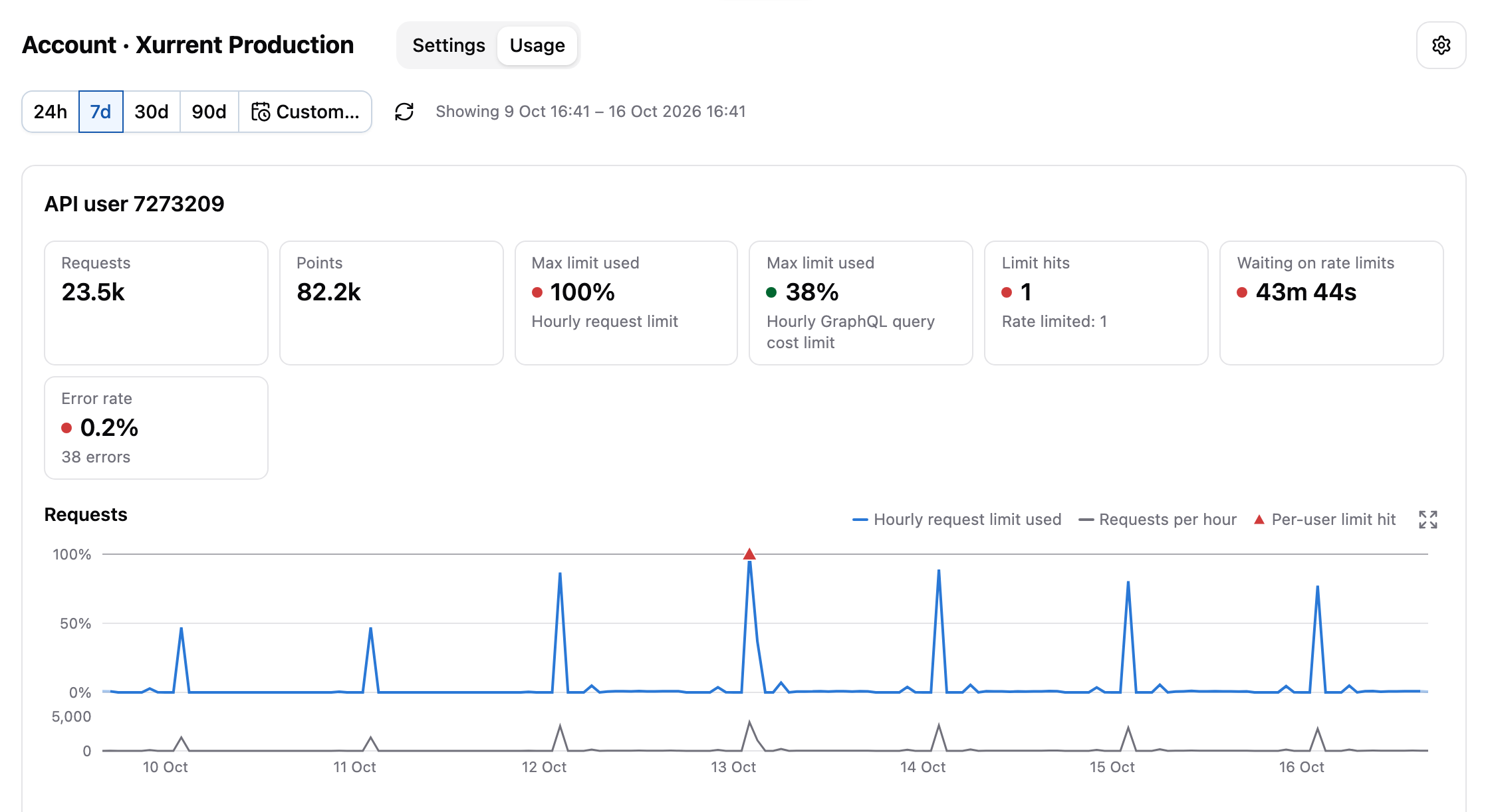
The tiles at the top summarize the usage of the credentials in the selected period. The Max limit used tile shows the highest share of the external system's limit that was used, and it's marked red when more than 85% was used at some point.
Below the tiles, there's a chart for each budget of the external system. For Xurrent, these are the number of requests and the cost of GraphQL queries, which are limited separately. Each chart shows the share of the limit that was used over time, the number of calls, and markers for the moments the limit was hit. A chart can be enlarged, and dragging across it zooms the tiles and the other charts in on that period.
Next comes the Calls by week and hour heatmap:
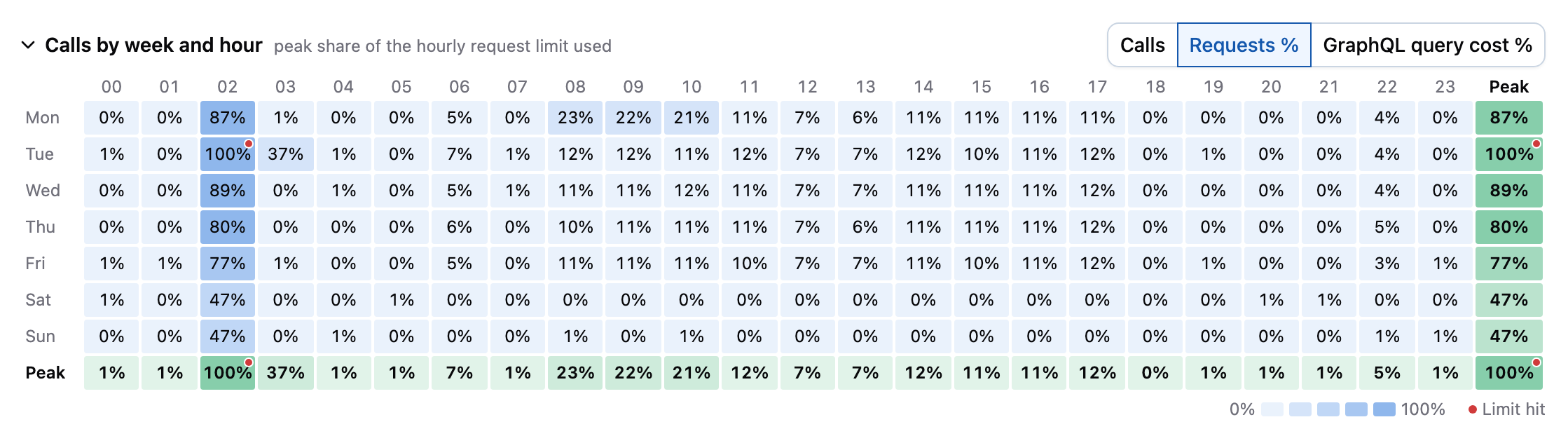
This heatmap adds up the calls of the selected period per weekday and hour of the day, or shows the peak share of the limit that was used. It makes recurring patterns easy to spot. For example, if a limit is only hit during a nightly import every day, it may be enough to spread out the work of that import. If a limit is reached during office hours on every weekday, it's probably time for an additional API token. The heatmap is shown when the selected time range is at least 3 days.
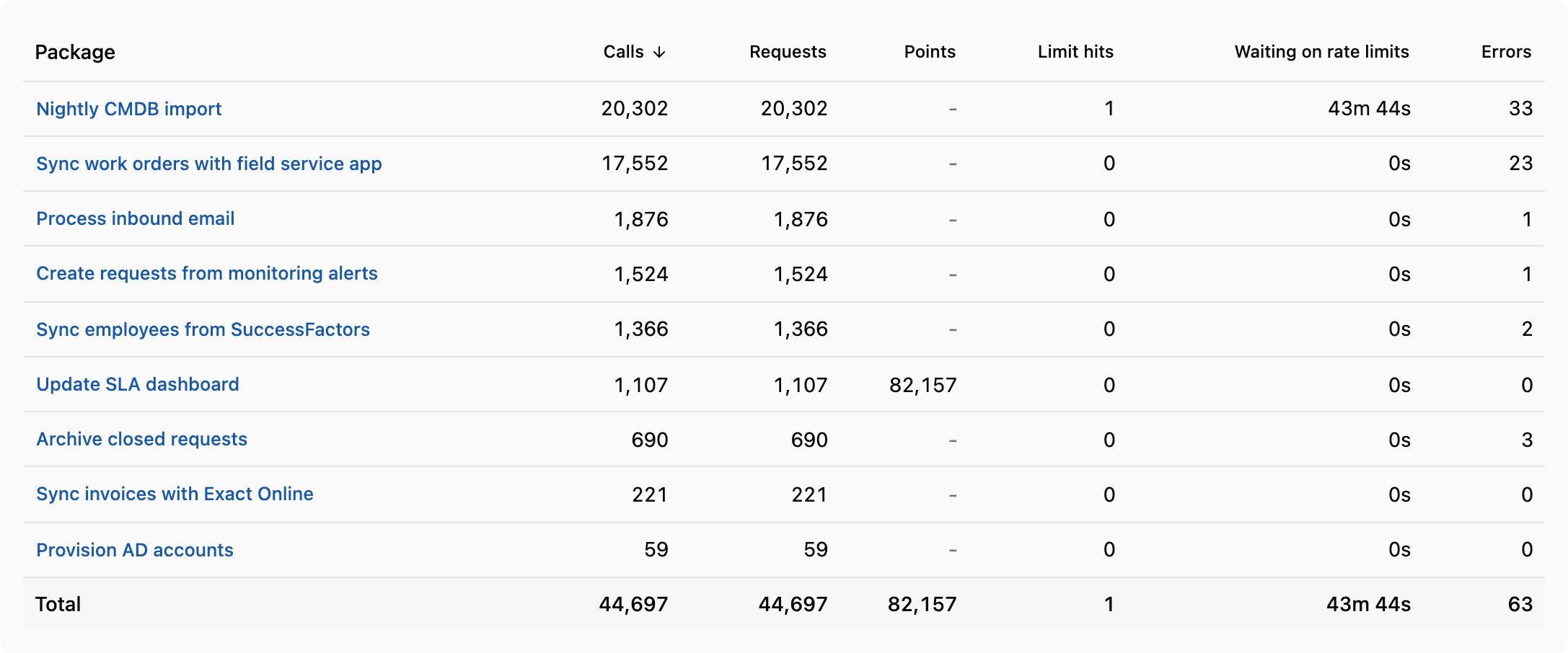
Finally, the Packages in this period table shows which packages called the account and how much. The table can be sorted by each column, and selecting a package opens its usage.
Usage of a package
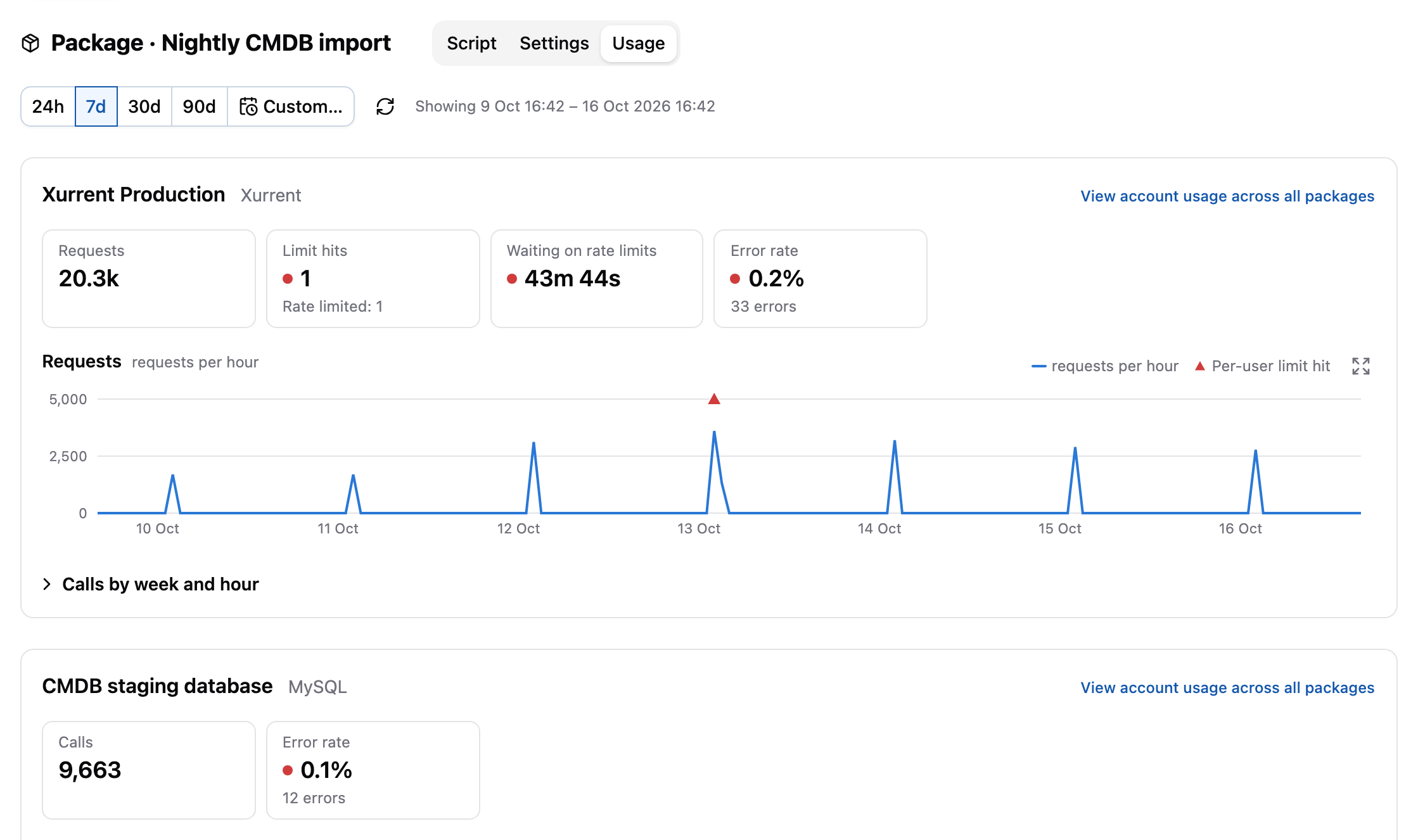
The Usage tab of a package shows the same information from the perspective of the package: a section for each account that the package called, with its own tiles and charts.
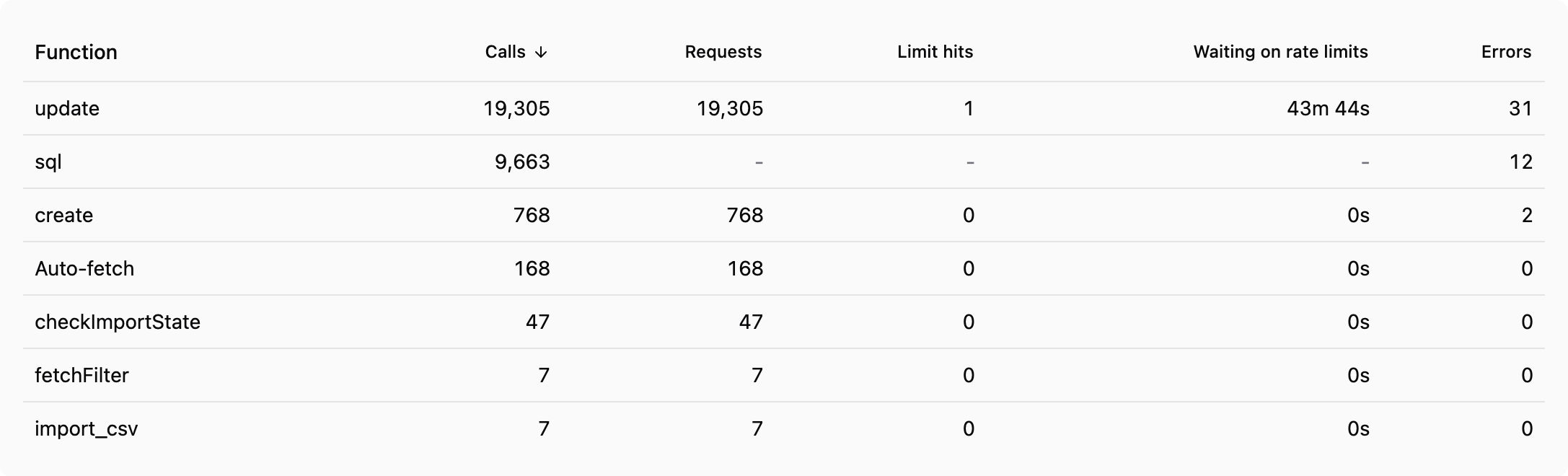
Below the accounts, the Functions in this period table shows which functions made the calls, such as fetchFilter,
update or http_post. This helps to find the part of a script that's responsible for most of the calls.
Usage of all accounts and packages
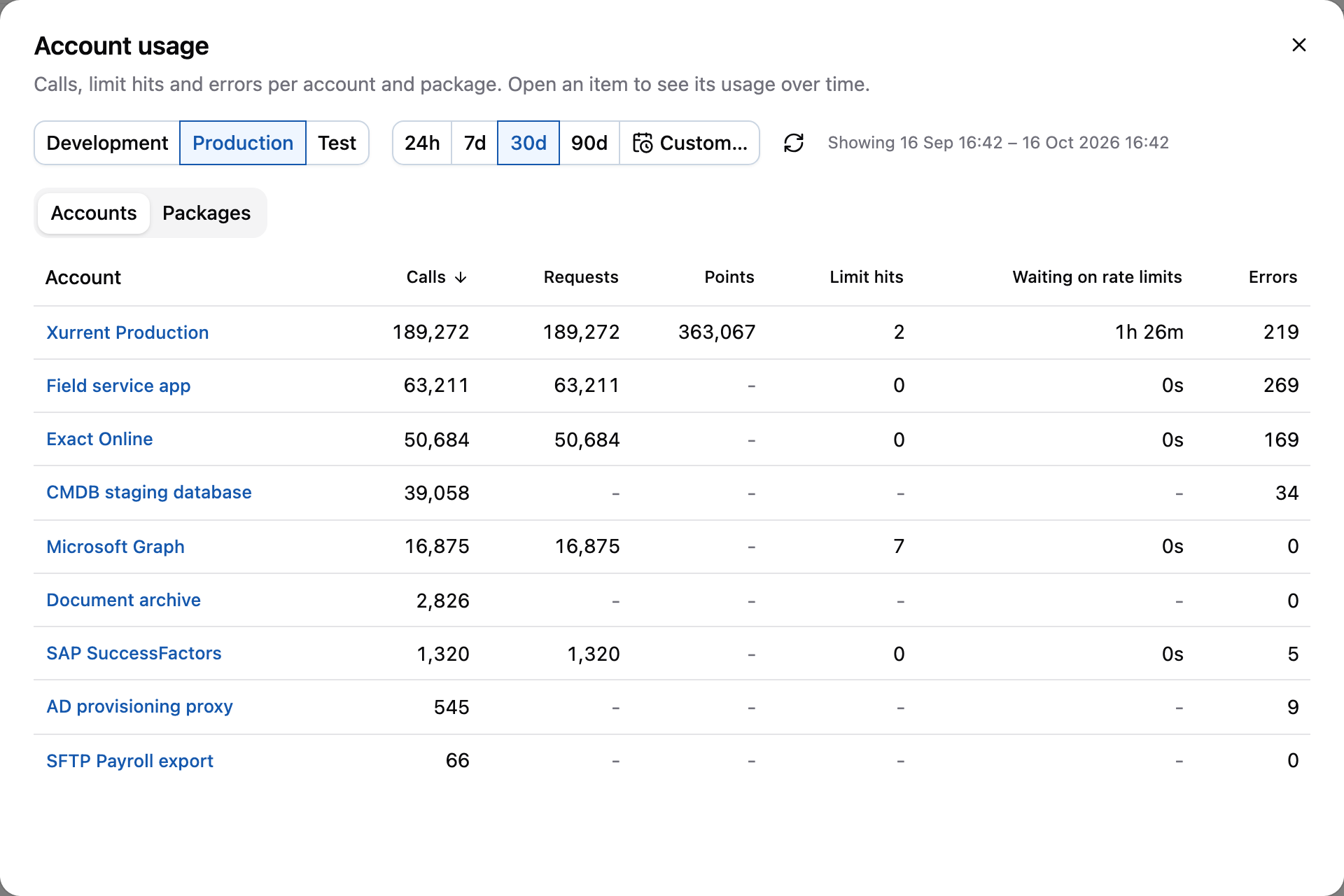
To see which accounts and packages are the busiest, select View account usage in the global actions menu in the header. The dialog shows the totals of all accounts and packages of an environment. You can switch between the environments of the profile, sort the tables by each column, and open the usage of an account or package by selecting it.
Environment and execution information
Two new sets of functions give a package access to information about the environment it runs in and about the current execution.
The Environment functions return the accounts of the environment.
Environment.account returns a single account by name, and
Environment.accounts returns all of them. Each account
contains its name and type, and depending on its type some extra attributes, such as the URL. Credentials are not
included.
For Xurrent accounts, the users attribute contains the person IDs of the users that are linked to the credentials of
the account (the API users). This is useful for a package that has to act as the automator itself. For example, to make
sure that the automator can approve a task, regardless of which of the account's API tokens it uses at that moment:
const users = Environment.account("wdc").users;
users.forEach((user) => addApprover(task.id, user.personId, "wdc"));
The Execution functions return information about the package execution that
is currently running:
Execution.idandExecution.uuidreturn the short and full ID of the execution, as shown in the package log. Use them, for example, to refer to the execution in a note or email.Execution.accountreturns the account of the trigger that started the execution.Execution.triggeredByreturns the person that triggered the Xurrent webhook event that started the execution.Execution.isTriggeredByAccountUserreturns whether that event was caused by one of the users of the account, which means it was most likely caused by the automator itself.
The last function is useful for packages that have the setting Allow webhook events triggered by a user of the account enabled, but still need to avoid possible automation loops:
if (Execution.isTriggeredByAccountUser()) {
  log("Skipping change made by the automator itself");
  return;
}
Unlike the apiUserId standard variable, which only contains the user of the first credentials of the account, this
takes all credentials of the account into account.
The package setting has been renamed from Allow webhook events triggered by the API user to Allow webhook events triggered by a user of the account, to make clear that it applies to all users of the account. Its behavior has not changed. See Webhook events triggered by a user of the account for more information.
Browser back button within a profile
The back and forward buttons of the browser now work when navigating within a profile. Previously, the back button left the profile and usually went back to the login page. Now, it goes back to the previously selected item, tab or environment, without losing your unsaved changes.
The title of the browser tab also shows the type of the selected item, the environment and the profile, such as
Nightly CMDB import · Package | Production | Acme Corp | techwork automator.
Other changes
This release contains the following smaller changes:
- The documentation has been restructured into Get started, Concepts, How-to guides and Reference sections. The release notes have been placed under a separate header and include an archive for historical release notes.
- In the transfer assistant, the Also select used libraries option now also selects the libraries of packages that were selected before the option was enabled. The packages are also grouped by type, with headers that stay visible while scrolling.
- The webhook endpoint (
/webhook/...) now only acceptsPOSTrequests. Previously, it also acceptedGET,PATCHandPUTrequests, which could cause, for example, a link preview in a chat application to accidentally trigger a package.
The following changes to the web application firewall (WAF) are deployed separately (see the timeline):
- Requests from IP addresses with a bad reputation, such as known sources of attacks and automated scanners, are now blocked. This is not expected to affect legitimate traffic.
- Requests with a query string longer than 2048 characters are now blocked. This affects, for example,
GETrequests to services that pass a lot of data in the URL. Use aPOSTrequest instead.
Timeline
The expected deployment dates for this release are:
| Environment | Date |
|---|---|
| Demo | Friday, October 16 |
| Production | Tuesday, October 20 |
| Production, WAF changes | Thursday, October 22 |
The deployment to the Production environment will be conducted outside of office hours (Central European Time Zone), usually between 8 and 10pm.