Release r202626
What's new
This release contains the following improvements and changes:
- Inbound webhooks separated from accounts
- Proxy: configuration in TOML
- Improved logging of falsey values
- New logWarn function
Inbound webhooks separated from accounts
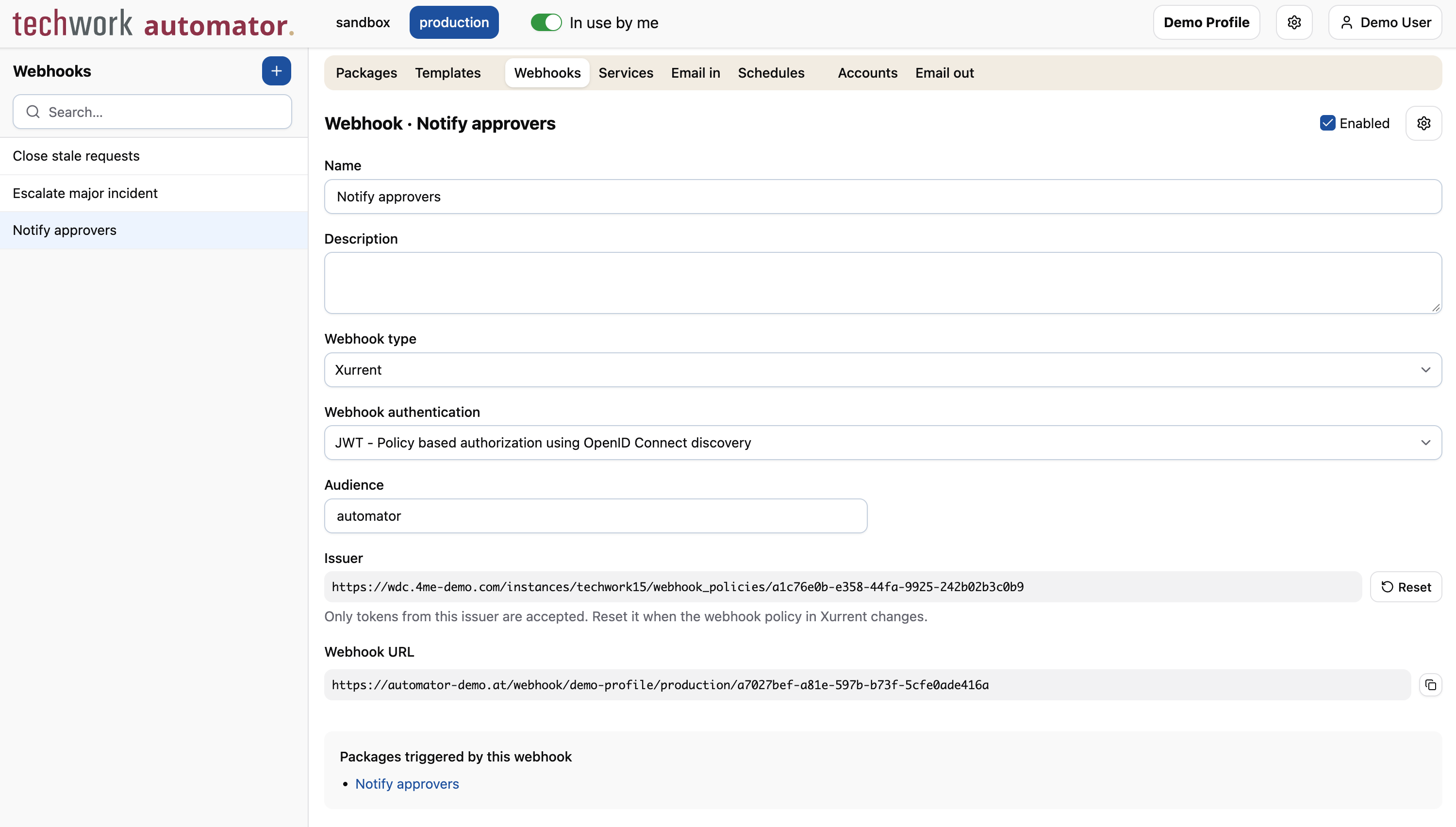
Webhooks were previously configured on the form of a Xurrent, HTTP, SOAP or MS Graph account. That mixed up two different concepts: an account configures an outbound connection, which the automator uses to call an external system, while a webhook is an inbound endpoint that is called by an external system.
Webhooks now have their own Webhooks tab, next to the other triggers: Services, Email in and Schedules. When adding a webhook trigger to a package, you select the webhook and the account separately. The webhook determines which inbound requests trigger the package, while the account is the default account for the package execution and identifies the API user.
Use case: one webhook per automation rule
Because a webhook is no longer tied to an account, multiple webhooks can now be used with the same account. This is very useful, for example, for integrations triggered by automation rules in Xurrent.
A common setup used to look like this: in Xurrent, many automation rules call the same webhook, and in the automator,
many packages are linked to that webhook's account with the automation_rule event. Every automation rule then triggers
all of those packages, even though they are unrelated to each other. Each package has to inspect the payload, for
example an action attribute set by the automation rule, to find out whether the event is meant for it, and most
executions finish immediately. A single automation rule can easily lead to dozens of package executions, of which only
one is actually relevant.
Instead, we recommend creating a separate webhook in Xurrent for each automation rule, with a corresponding webhook in the automator that triggers only the package that handles that rule:
- In the automator, create a webhook of type Xurrent on the Webhooks tab, for example
Escalate major incident, and configure its authentication. - In Xurrent, create a webhook with the
automation_ruleevent that calls the URL of the new automator webhook, and use it in the automation rule. - In the package, add a webhook trigger with the new webhook, the Xurrent account and the
automation_ruleevent.
This has several advantages:
- Only the package that handles the automation rule is executed, avoiding many unnecessary package executions.
- The package script no longer needs code to check whether the event is meant for it.
- The Packages triggered by this webhook section of a webhook shows which package handles which automation rule, which makes the integration easier to maintain.
- Each execution in the package log corresponds to an event that was actually meant for that package, which makes logging and debugging much easier.
Existing webhooks
Existing webhooks have been migrated automatically. Each account with webhook triggers now has a webhook with the same name, and the package triggers of the account are linked to it. The URLs of existing webhooks have not changed, so no action is needed in Xurrent or other external systems.
Webhooks using JWT authentication have a new Issuer field. Previously, the automator derived the issuer from the URL of the account. For migrated webhooks, the issuer has been filled in from the webhook events received earlier. When the field is empty, the issuer is determined from the first token signed by a webhook policy on a Xurrent domain. If your Xurrent account uses a custom domain, set the issuer manually.
See Webhook configuration for more information.
Proxy: configuration in TOML
The automator Proxy now reads its configuration from TOML files:
conf.tomlfor the proxy settingsservice_config.tomlfor the Windows service settings
TOML needs less punctuation than JSON and allows comments, so the configuration files can be annotated with extra information.
Each profile is configured in a [[profile]] section. When using the
script execution mode, each script a
package may run is configured in a [[profile.script]] section below its
profile. This is what it looks like:
shell = "powershell"

[[profile]]
name = "create-user"
mode = "script"
token = "<your-token>"
key = "<your-key>"
automator_url = "<the Automator URL copied from the account>"

[[profile.script]]
name = "createUser"
file = "scripts/createUser.ps1"
params = ["-Name", "-Department"]
Existing installations keep working with their conf.json and
service_config.json: the proxy reads them when no TOML file is present.
See Configuration for all settings.
This change is part of proxy version 2.202626.0, which can be requested from techwork.
Improved logging of falsey values
When the message passed to log or one of its relatives was a falsey value, such
as an empty string, null, 0 or false, the log showed LOG: instead of the value. These functions now behave like
console.log in JavaScript and log the value itself:
log("");        // => (empty line)
log(null);      // => null
log(undefined); // => undefined
log(0);         // => 0
log(false);     // => false
log();          // (nothing is logged)
Note that calling log() without arguments does not produce a log line at all.
New logWarn function
Until now, packages could write log lines at the Info, Verbose, Debug and Error levels. Warnings were only written by the automator itself, for example when an API call is paused by a rate limit.
The new logWarn function lets a package write warnings as well. Use it for
conditions that are unexpected but handled, where the package continues normally. Such conditions then stand out in the
log without being reported as errors:
if (!person.primary_email) {
  logWarn("Person has no email address, skipping", person);
}
The Log level setting of a package now also has a Warn option. If you use this log level, only warnings and errors are logged. See Package configuration for more information.
To round out the set of log functions, logInfo has been added as well,
so that there is now a logX function for every level.
The existing log function is equivalent to logInfo.
Other changes
This release contains the following smaller changes:
- Proxy: the shell settings (
shell,shell_path,init_cmdandenv_vars) are now global configuration options: the proxy runs on one machine, so they are set once at the top of the file instead of on every profile. - Proxy: the proxy only listens for incoming connections when a port is
configured (the
portsetting of the Windows service, or thePORTenvironment variable). When using the pull transport mode no listener is needed, but previously one was started on a default port anyway. Push-mode installations relying on the old default ports must now set the port explicitly. - The Xurrent REST and GraphQL model metadata has been refreshed to include all field changes up to September 26, 2026. This affects code completion and field documentation for the corresponding endpoints.
- Fix: the
http_get,http_post,http_putandhttp_patchfunctions now also honor the timeouts described here. - Fix: outbound email configurations using a Microsoft Graph SendMail API mail server now honor the value of the "Reply to" field.
- Fix: package executions with multiple calls to
lock_requestare no longer incorrectly marked as "Failed" after completing successfully.
Timeline
The expected deployment dates for this release are:
| Environment | Date |
|---|---|
| Demo | Friday, October 2 |
| Production | Tuesday, October 6 |
The deployment to the Production environment will be conducted outside of office hours (Central European Time Zone), usually between 8 and 10pm.