Account usage
The automator records how every account is used. This includes how many calls the packages make to the external system, how often a limit of that system was hit, how long calls had to wait because of those limits, and how many calls failed.
The account usage reports can help to answer questions such as:
- How close are the integrations to the limits of the external system?
- Is a limit reached all the time, or only at certain moments, for example during a nightly import?
- Which package, and which part of its script, is responsible for most of the calls?
- Do we need an additional API token, or is it enough to spread out the work over time?
Usage is kept for 90 days. It's collected per minute, so it can take up to a minute for a call to show up.
What is recorded
Every function that uses an account records its usage, for every type of account:
- the HTTP, REST, Xurrent and SOAP functions, and auto-fetch
- the database, SFTP, file repository, AWS and proxy functions
For each call, the automator records the account, the credentials, the package and the function that made the call, and its outcome.
Many APIs, including Xurrent, report their limits and how much of them remains in the headers of each response. The
automator reads these headers, so that it knows how much each call counted towards a limit, and how much of the limit
was used at that moment. This is supported for Xurrent, for the RateLimit headers of the
IETF standard, and for the widely used
X-RateLimit-Limit and X-RateLimit-Remaining headers. For other APIs and other types of accounts, the calls, limit
hits and errors are recorded, but not the share of the limit that was used.
Measures
The usage views show the following measures, depending on what applies to the account:
- Calls: the number of calls made to the external system.
Each attempt counts, so a call that was retried counts more than once. - Requests: the number of requests that counted towards the request limit of the external system, as reported by the external system.
- Points: the cost of the GraphQL queries that counted towards the GraphQL query cost limit of Xurrent.
- Max limit used: the highest share of a limit of the external system that was used in the period.
It's marked green below 50%, orange from 50% to 85%, and red above 85%. - Limit hits: the number of calls that were rejected because a limit was reached.
Calls can be rate limited (the external system responded with status429or asked to retry later), cost limited (the GraphQL query cost limit of Xurrent was reached) or WAF blocked (blocked by the AWS Web Application Firewall in front of the external system). - Waiting on rate limits: the total time calls were held back by the automator because a limit of the external system had been reached.
- Error rate: the share of calls that failed, for example because of an error response or a timeout.
Limit hits are not counted as errors.
Credentials
External systems usually apply their limits per set of credentials, such as an API token or Client ID (also known as a tenant). That means that an account that has configured two sets of credentials can make twice as many requests per hour as an account with a single set. The Usage tab of an account therefore shows the usage of each set of credentials separately.
When multiple accounts use the same credentials all their calls count towards the same limits. The usage of such credentials includes the calls of all those accounts, and the Usage tab mentions that the credentials are shared. An example of this is a profile that needs to connect to multiple Xurrent support domain and uses the same API user for all these connections; in this case there's an automator account with the same credentials for each corresponding Xurrent support domain.
Viewing usage
The usage can be viewed in three places:
- the Usage tab of an account
- the Usage tab of a package
- View account usage in the actions menu in the header, for the totals of all accounts and packages of an environment
Selecting the period
Each view shows the last 7 days by default. Use the buttons at the top to switch to the last 24 hours, 30 days or 90 days, or select Custom… to select a time range. The refresh button loads the latest usage. Times are shown in the time zone of your browser.
To take a closer look at a busy moment, drag across a chart to zoom in. The other charts, the tiles and the tables then show the usage of the zoomed in period. Select Reset zoom to go back to the whole period.
A chart can also be enlarged, which opens it in a separate window with its own period.
Usage of an account
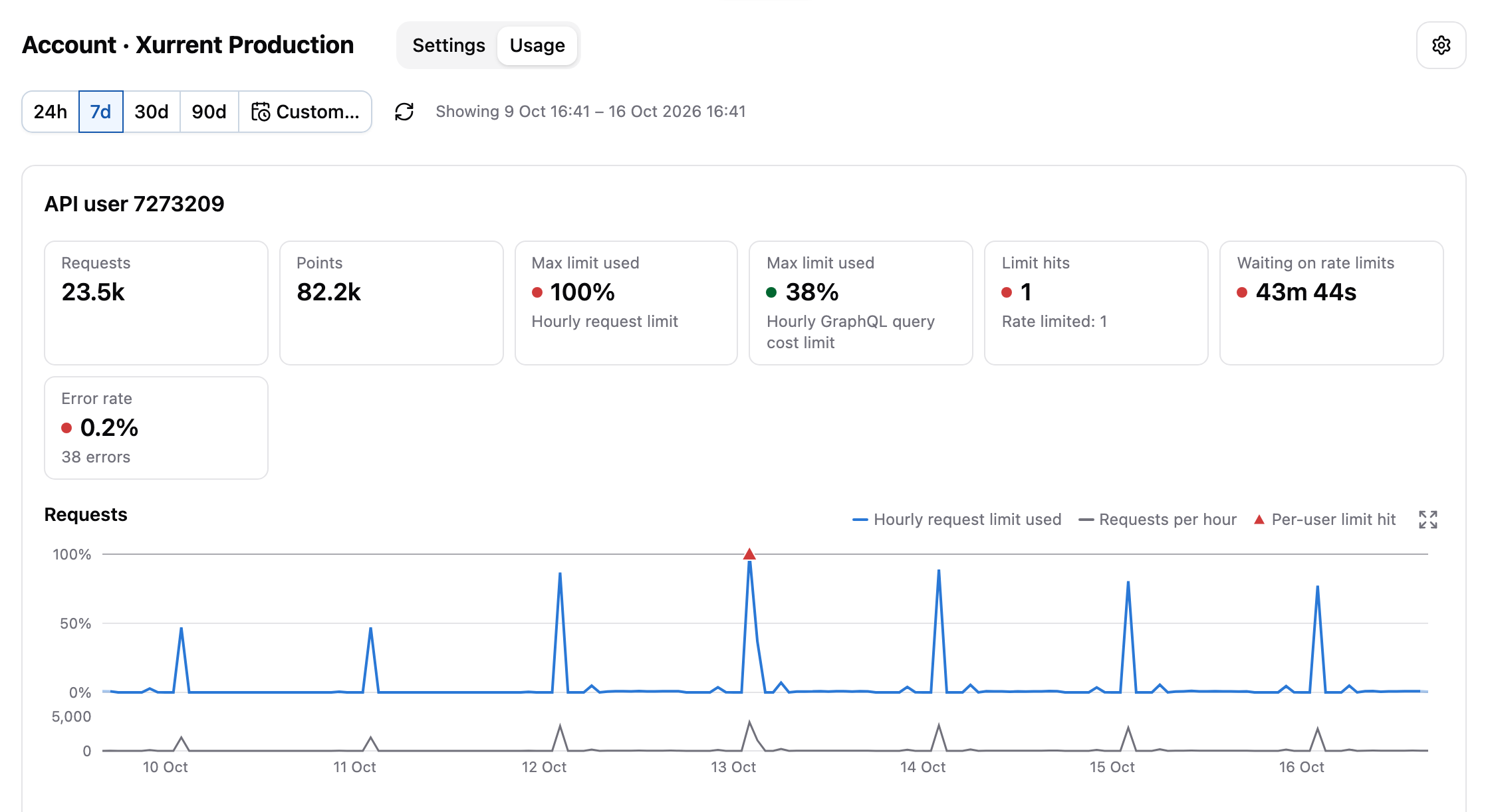
The Usage tab of an account has a section for each set of credentials that was used in the period.
Each section starts with tiles that summarize the measures of the period. Below the tiles, there is a chart for each limit of the external system. For Xurrent, these are the request limit and the GraphQL query cost limit, which are independent of each other. A chart shows the share of the limit that was used over time, with the number of requests or points below it, and a marker at each moment the limit was hit. For external systems that don't report their limits, the chart shows the number of calls and the limit hits.
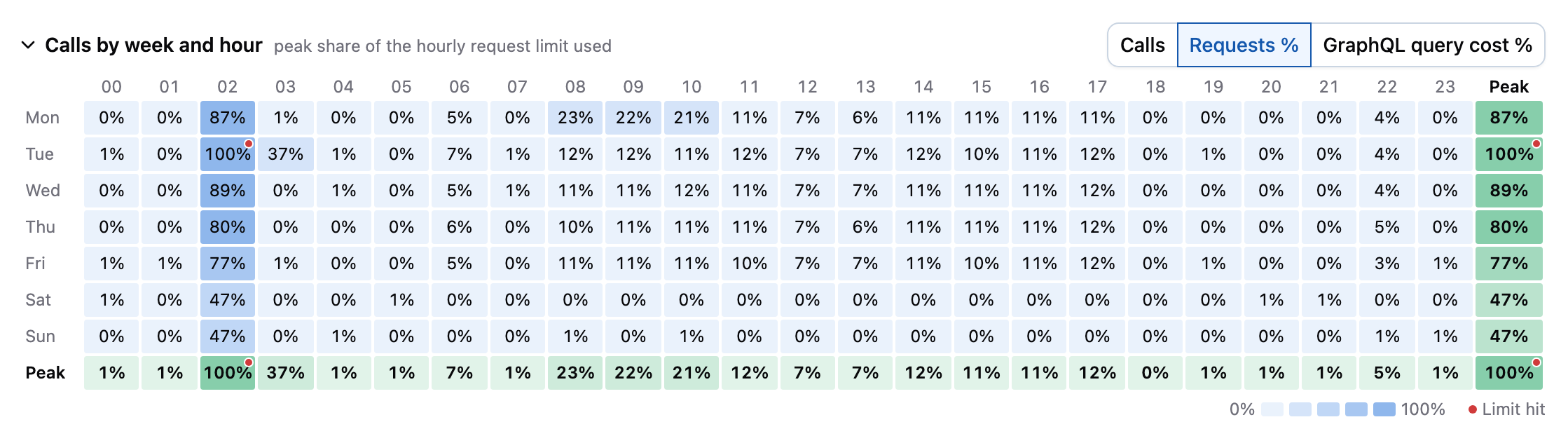
The Calls by week and hour heatmap adds up the calls of the period per weekday and hour of the day. For credentials with a known limit, it can also show the highest share of the limit used in each hour. The heatmap makes recurring patterns easy to spot, and is shown when the selected time period is at least 3 days.
Finally, the Packages in this period table lists the packages that called the account. Select a package to open its usage.
Usage of a package
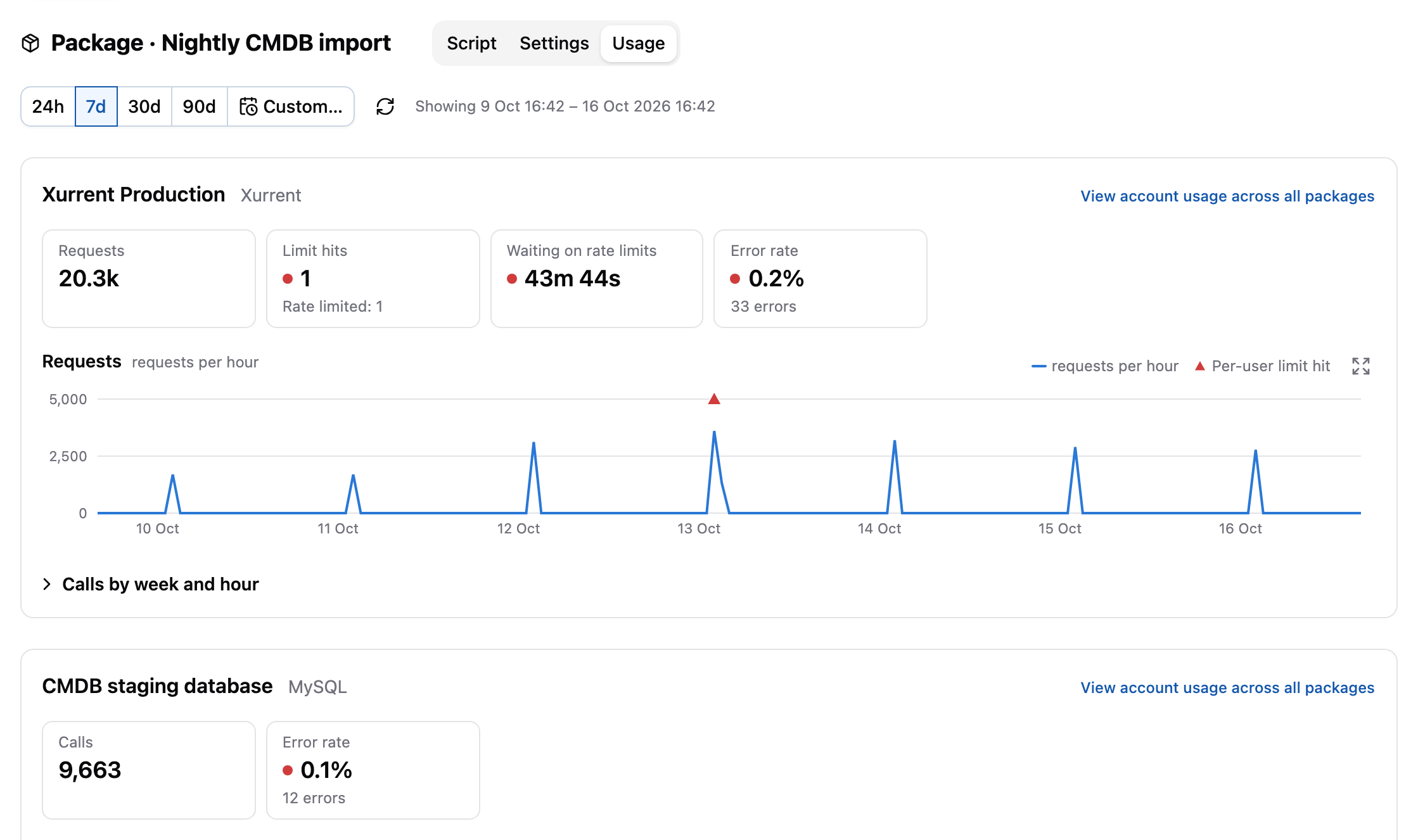
The Usage tab of a package has a section for each account that the package called, with the same tiles and charts as the Usage tab of an account, limited to the calls of the package. Select View account usage across all packages to open the usage of the account itself, including the calls of all other packages.
When the package called more than one account, the heatmaps start out collapsed, to keep the page short.
The Functions in this period table lists the functions that made the calls, which helps to find the part of the script that's responsible for most of the calls. Calls made by auto-fetch are listed as Auto-fetch.
Libraries don't have a Usage tab, because their calls are recorded for the packages that use them.
Usage of all accounts and packages
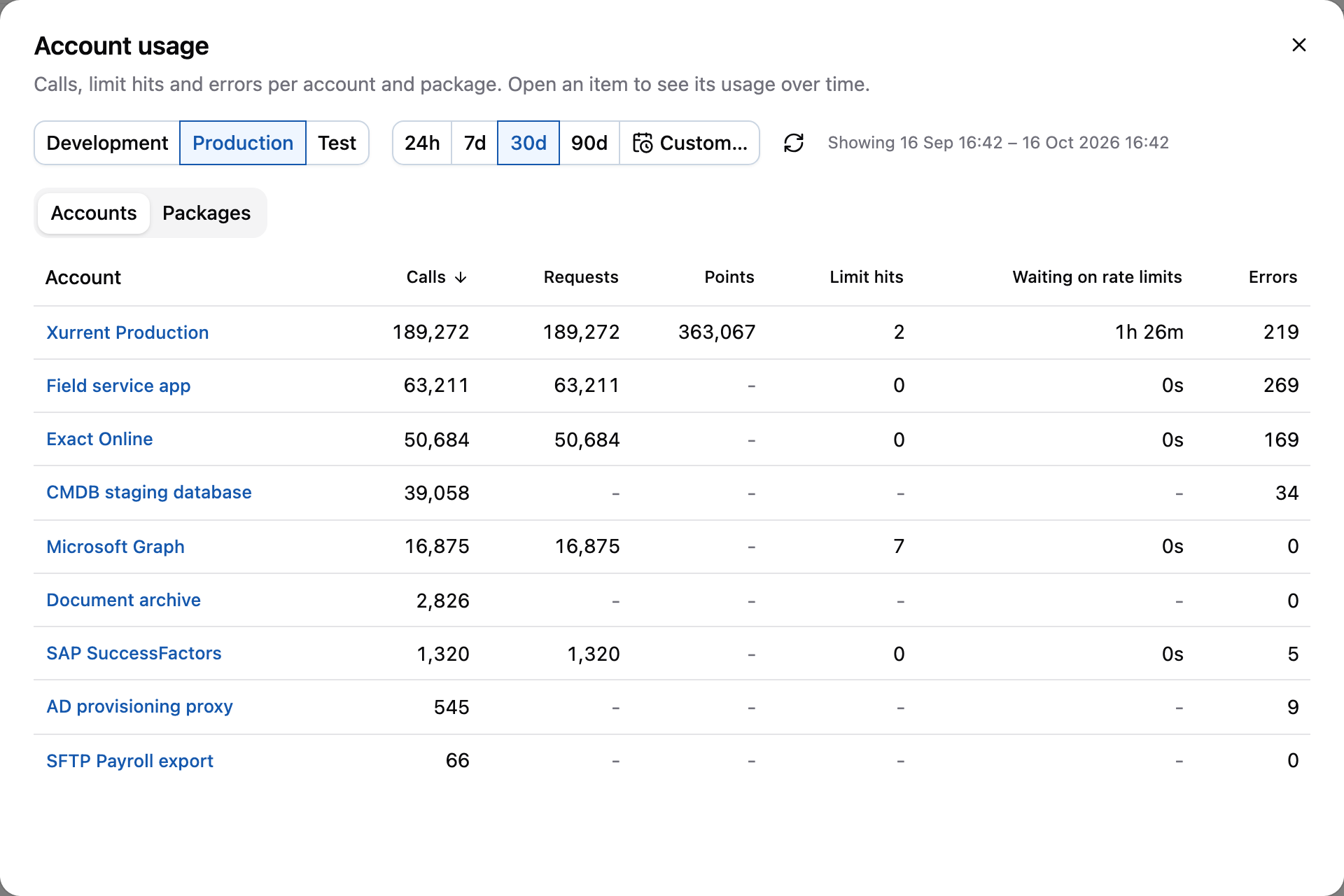
Select View account usage in the actions menu in the header to see the totals of all accounts and packages of an environment. Use the buttons at the top to switch between the environments of the profile, and the Accounts and Packages tabs to switch between the totals per account and per package. The tables can be sorted by each column. Select an account or a package to open its usage.
See also
- Investigate rate limit hits shows how to use the account usage to find out why a limit is reached, and what to do about it.
- Auto-retry for API calls describes how the automator handles rate limits.